Google’s new Audio Overview feature can turn documents, slides, charts and more into engaging discussions with one click, read more below on the latest news
Over the summer, NotebookLM expanded globally and used Gemini 1.5’s multimodal capabilities to power new features, such as Google Slides and web URL support, better ways to fact-check, and the ability to instantly create study guides, briefing docs, and more.
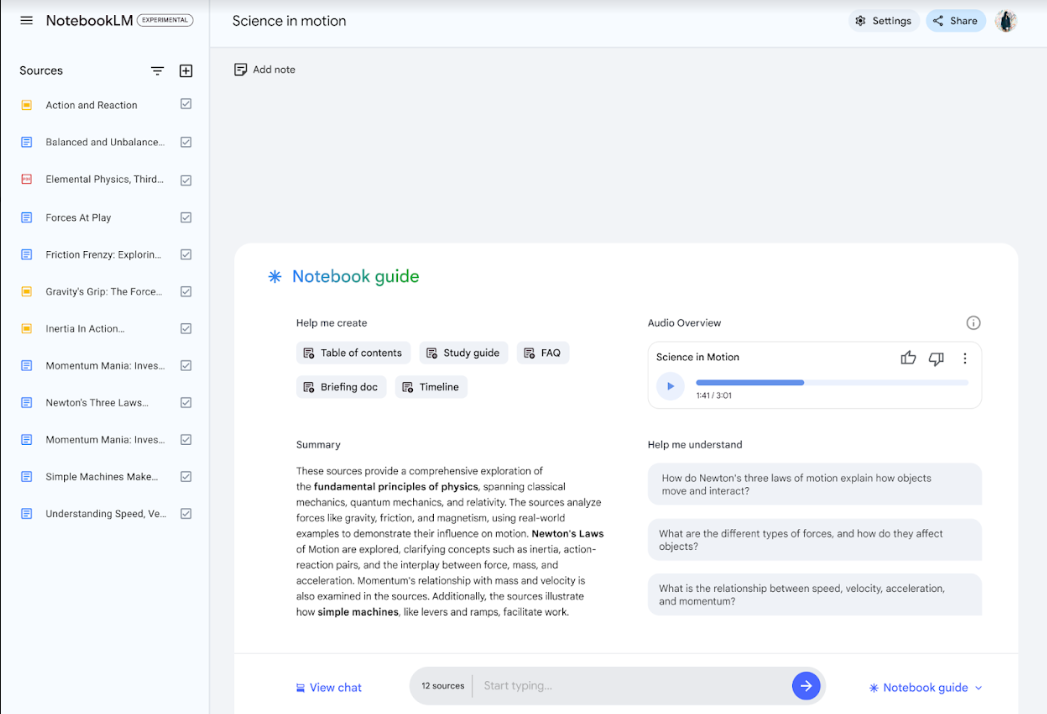
Today, we’re introducing Audio Overview, a new way to turn your documents into engaging audio discussions. With one click, two AI hosts start up a lively “deep dive” discussion based on your sources. They summarize your material, make connections between topics, and banter back and forth. You can even download the conversation and take it on the go.
It’s important to remember that these generated discussions are not a comprehensive or objective view of a topic, but simply a reflection of the sources that you’ve given it.
To try it out, follow these steps:
-
Open an existing notebook
-
Open your Notebook guide
-
Click on the “Generate” button to create an Audio Overview

Audio Overview is still experimental and has some known limitations. For example, for large notebooks, it can take several minutes to generate an Audio Overview. Also, when the AI hosts are explaining your sources today, they only speak English, sometimes introduce inaccuracies, and you can’t interrupt them yet.
We’re excited to bring audio into NotebookLM since we know some people learn and remember better by listening to conversations. Be sure to share your feedback so we can make Audio Overviews an even better way for understanding the information that matters most to you.
Read more here.