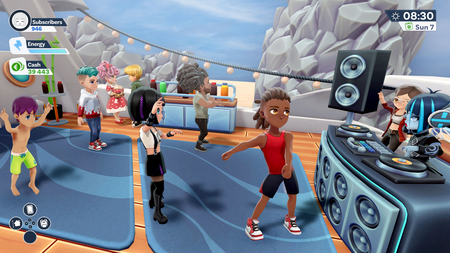
Youtubers Life 2, will launch on PC, PlayStation, Xbox, and Nintendo Switch on Tuesday 19th October, 2021.

Youtubers Life 2, will launch across PC, PlayStation, Xbox, and Nintendo Switch on Tuesday 19th October, 2021.

Following up the multi-million selling original Youtubers Life, the new game opens up its world to its players and lets them step out of the bedroom for the first time to explore ‘NewTube City’.

But this brand new metropolis isn’t just a playground: Its streets will also serve as the player’s connection to the hot new trends they need to be making content about. Players will be able to hunt out the new trends other content creators are unaware of, making the most of their appeal with fresh videos. NewTube City is the key to your Youtuber taking on the world. They’ll even have a cute and customisable drone who follows them around on their adventures, recording videos to serve as content as they go.

What’s more, Youtubers Life 2 also features huge YouTubers actually in play, including PewDiePie, CrainerLaurenzSideRubiusPalutenInoxTagWillyrexGermanLetsPlayVegetta777 and xFaRgAnx.

“It’s almost five years since the first Youtubers Life came out, and the game still has a large loyal player base, which is exactly why we wanted to take what they loved from the original and make it even bigger and better with this follow-up,” offers Sergio de Benito, Marketing Director at Raiser Games. “The addition of NewTube City takes that original bedroom setting from the first game and turns it into a fully-functional world, featuring activities and trends content creators can use to power their videos. Plus, actually building in real YouTube talent has been an honour. We think Youtubers Life 2 is the ultimate content creator simulator.”

In Youtubers Life 2 you will be able to: –

  • Create content on different apps: NewTube, Glitch, and InstaLife.
  • Explore NewTube City throughout three different neighborhoods: The City Hall, Downtown, and the Port. Each one has unique stores, leisure centers, activities, and other Youtubers (NPCs) with whom we can build a social relationship.
  • Follow different trends triggered at different times, take pictures to Instalife, or record VOD and streamings on the way. The city is alive and will be a key to your development as a Youtuber.
  • Record your progress on your Drone – your closest, customisable friend who will follow you on your adventures.
  • New customisation options for your character and for your home. For the first time in the franchise, we will be able to customize our home and setup with our preferred style.

Youtubers Life 2, will launch across PC, PlayStation, Xbox, and Nintendo Switch on Tuesday 19th October, 2021 for $29.99/£24.99 on PC, and $39.99/£34.99 on console.

PewDiePie and Crainer On Board to Serve as Mentors in Content Creator Simulator ‘Youtubers Life 2

Entire Team of Superstar YouTubers Will Appear in the Game to Inspire the Next Generation

For the past decade, PewDiePie – known as Felix Kjellberg to his friends – has been one of the most popular YouTubers on the planet, with more than 110 million subscribers around the world at last count hanging on his every word, for better or worse.

Who better, then, to pass on the fruits of his wisdom to the next generation of content creators?

Raiser Games and UPLAY Online are excited to announce that PewDiePie will be headlining a  cast of real life YouTubers who will all appear in forthcoming content creator simulator Youtubers Life 2. Taking on the role of guardians – or ‘Senpais’, as PewDiePie fans may be more accustomed to hearing – Kjellberg and a cast of 10 YouTubers in total will appear in the game in side-missions, offering players the opportunity to increase their knowledge and experience in specially set challenges.

Also joining the line-up will be CrainerLaurenzSideRubiusPalutenInoxTagWillyRexGermanLetsPlayVegetta777 and xFaRgAnxYoutubers Life 2 will offer aspiring content creators the opportunity to live out their YouTube dreams in relative safety when it launches on PC, PlayStation, Xbox, and Nintendo Switch later this year.

According to Sergio de Benito, Marketing Director at Raiser Games, working with some of the world’s most popular YouTubers should give players an example of the responsibility that comes hand in hand with wielding considerable influence.

“Fame is a fickle beast and – like film stars, pop stars, and sports stars before them – YouTubers have spent the last decade finding out that, once you hit the big time, everything you do or say is under the microscope,” says de Benito. “We thought that having real life YouTubers in play was a must for Youtubers Life 2, because they are the only people on the planet who can, with some authenticity, pass on advice based on the highs and lows they’ve both enjoyed and endured whilst in the public eye. They really will be the players’ guardian angels.”

All of the YouTubers will appear in dedicated, specialised side-missions, challenging players to carry out fun tasks increasing their knowledge and experience in the process. They will act as the icing on the Youtubers Life 2’s considerable cake, adding an extra slice of realism to proceedings.

“It’s been really interesting working with the Youtubers Life 2 developers to make sure my likeness comes across in play,” adds Crainer. “I hope my subscribers get a real kick out of seeing me in the game.”

In Youtubers Life 2 you will be able to: –

  • Create content on different apps: NewTube, Glitch, and InstaLife.
  • Explore NewTube City throughout three different neighborhoods: The City Hall, Downtown, and the Port. Each one has unique stores, leisure centers, activities, and other Youtubers (NPCs) with whom we can build a social relationship.
  • Follow different trends triggered at different times, take pictures to Instalife, or record VOD and streamings on the way. The city is alive and will be a key to your development as a Youtuber.
  • Record your progress on your Drone – your closest, customisable friend who will follow you on your adventures.
  • New customisation options for your character and for your home. For the first time in the franchise, we will be able to customize our home and setup with our preferred style.

Raiser Gamers and UPLAY Online will have more to announce regarding Youtubers Life 2’s forthcoming launches in the months ahead.

YouTube Kids App launches on Virgin TV 360 Platform

Virgin Media is excited to announce the launch of YouTube Kids on the Virgin TV 360 platform. YouTube Kids is an app which gives parents greater peace of mind and more control over their children’s viewing habits.

The app lets parents and kids access a wide range of age-appropriate content across a number of popular genres and is divided into key segments including Shows, Music, Explore and Gaming. YouTube Kids is a place to help ignite children’s inner creativity and playfulness and has everything from their favourite shows and music to learning how the world works.

Families who are already users of the YouTube Kids app can simply sign into their account and if you’re new to YouTube Kids, setting up is super easy and user-friendly.

The app allows you to select your preferred content level setting from ‘Preschool’ (ages 4 and under), ‘Younger’ (ages 5-8) and ‘Older’ (ages 9-12). This selection will help to decide the types of videos available to users of the app. You also get peace of mind, knowing that the content they’re seeing is family-friendly based on a mix of automated filters built by YouTube Kids engineering teams, human review and feedback from parents to protect young users online.

You can explore the YouTube Kids app on your Virgin TV 360 set top box by going to the Apps section on the main menu and you’ll see YouTube Kids listed in the ‘Our Selection’ section.

The YouTube Kids app adds to a growing list of content streaming apps available on the Virgin TV 360 platform including Netflix, Amazon Prime and YouTube.

Best Ring Light for Live Streaming, YouTube Videos in 2021

The e-commerce model has long been changed from graphic to live streaming, and the economic benefits brought by the live streaming operations have gradually left the traditional graphic behind. Now everyone can shoot their videos / live, so it is particularly important to choose a live light that can show the filming effect in place. And the popularity of the ring light follows the trend of the times, as it comes with the convenience of the public is also more popular.

Why the Ring Light?

➫ Ring lights are friendly to beginners who record video.

➫ A ring light is cost-effective. More space-saving than other lighting kits used in photography, to meet the needs of different scenes, and a gimbal stand can provide a fixed phone, camera interface, to facilitate multi-angle portable shooting.

The ring light has a beauty light fill function. It can make people more photogenic, and a catchlight will be reflected in the eyes. This certainly makes the eyes more attractive.

➫ The light in everyday life is sunlight, it will be scattered in all directions, while the ring light can be moved when using the position to provide ” even and flawless ” lighting, shooting different effects.


Why is the ring light rather than the panel light?

Panel lights can also be, but if the light source to achieve a large area, such as an 18-inch diameter circular panel, such a large area are plastered with lamp beads, the power and brightness will be extremely high, also relatively expensive. This is why a ring-shaped light is made to not only ensure the light-emitting area but also increase the lighting angle to ensure that the face is in the middle of the ring, then at all angles can be exposed to an equal amount of sufficient light without those unpleasant shadows.

Therefore, the ring light is greatly loved by many digital content creators.

How to buy and choose from so many styles of ring lights on the market?

First, from the ring diameter. For a large live broadcasting room, whole-body shots, and thus need a large ring light, it is recommended to directly choose the diameter of 18 inches and above the ring light. If it is in the room, or only shoot the upper body, the purchase of the diameter of the about 10-inch ring light is adequate.

Adjustable color temperature. The skin will look naturally soft in warm light, and it could make you feel relaxed and happy when chatting with the audience. If you want the space in warm but clearer or cleaner white, you may choose warm white mode. The color presentation of room is very important to viewing experience. If you want the clearest display of your product or look, then white light is the best choice.

Power supply method. USB direct power supply method is simple and fast, not affected by the scene.

Raise and lower the height. Adjustable height ring light, whether standing live or sitting live.

Heat Dissipation performance. Led in the work will send out a lot of heat, if not timely dissipate heat, too high a temperatures will greatly reduce the overall lifetime of the ring light.

Overall I would recommend Asnoty ring light with stand, which meets all the above basic functions which should be there. Recently their 10-inch ring light is on sale, if you are a content creator, it is worth trying this ring light. 

How to Download Videos from Any Website with SnapDownloader

There’s plenty of entertaining videos on the internet that aren’t offered for offline viewing. Here’s how you can get your hands on all of the high-definition videos to watch offline with SnapDownloader.

Ever since videos sharing websites like YouTube, Metacafe, and Dailymotion, along with social media giants such as Facebook, Reddit, Instagram, and others, took over, the content creation and sharing of videos have skyrocketed. It isn’t a secret that video content is growing on social media platforms, which is why services such as IGTV by Instagram and the video-centric platform of Facebook Watch were created in the first place. YouTube alone is home to more than 1 Billion active users, which means virtually unending videos that you could watch during your entire lifetime. 

Why SnapDownloader Video Downloader?

With thousands of big-time content creators out there, millions of up-and-coming independent content creators, and news organizations offering plenty of video content on these media platforms, you have all the reasons to download videos for viewing offline, and SnapDownloader is here to make it easier than ever. But there are already hundreds, if not thousands, of different video downloaders out there, so what makes SnapDownloader any better than the rest? 

SnapDownloader Features: 

Supports 900+ websites – SnapDownloader enables you to download video content not just from social media networks such as Facebook and Instagram but more than 900 websites, which includes the unconventional ones such as Reddit, TikTok, BBC, and more. 

Convert videos to MP3 audio – This distinct feature comes in handy when obtaining audio content on websites such as YouTube. Whether you wish to fetch audiobooks, podcasts, audio tracks, or documentaries, SnapDownloader helps you get it done. 

Download in 8K quality – While YouTube is currently the only platform that supports 8K streaming, SnapDownloader already supports downloading it. Additionally, you can fetch videos in 4K, 1080p Full-HD, 720p, and even other standard video formats too. 

Built-in proxy – SnapDownloader brings the ability to quickly set up a geo-proxy and get past the geo-restrictions on YouTube and other social media platforms. If you want to download a video from a website that is restricted in your country of residence, SnapDownloader will get the job done. 

Users love the UI – One of the biggest pain points with hundreds of other video downloaders is the dated user interface and a barrage of ads that cloud everything. SnapDownloader keeps it all neat and clean for you to enjoy the video viewing experience every time, and no unsolicited advertisements that could harm the device. 

Cutting-edge advanced features – Apart from getting the core features right, SnapDownloader adds a cherry on the pie with video editing features baked into the app. You also get a Bulk Downloads feature to fetch up to 15 videos from different sources, all at once. 

Download Videos from Any Website with SnapDownloader

Before you can begin enjoying the best of video content without an active internet connection, you will need to download the SnapDownloader app, and here’s how you go about it:  


  • Install SnapDownloader for Windows or macOS and launch the app to continue. 

  • Launch the web browser and open YouTube, Facebook, or any other video-sharing platform from where you wish to download the video.


  • Copy the video link by right-clicking on it and paste the link of the video in the SnapDownloader app.

  • Similarly, you can also use the search bar to enter a keyword and search the video online.


  • Select the option of Output (MP4 or MP3), where you can even convert the video to an MP3 file directly.


  • Now, choose the Video Quality in which you wish to download the video.

  • Press the Download button to begin right away, or select Schedule for later if you wish to fetch the video at a later time. 


  • The download will begin, and details such as the file size, download speed, and even the estimated time left will be showcased.


That’s all there is to it! You will now have the video ready for viewing offline. While one video is downloaded, you can also cue up to 15 videos for downloading on SnapDownloader, all at once!


Final Words

The complete process for downloading videos from any other popular social media platform like Facebook, Twitch, Twitter, and other video-sharing platforms is exactly the same. All you have to do to get started is fetch the video URL, enter it into the search field of the SnapDownloader app, and you’re all done. While there are plenty of video downloader services that tend to help you download YouTube videos, the number of service providers for fetching content from other social media platforms is fairly limited, which is why SnapDownloader comes in handy.

Are you hoping to give SnapDownloader a try and see how it can help you download any video from the World Wide Web with just one click? We would love for you to let us know your thoughts on SnapDownloader in the comments section down below. 


4K YouTube to MP3: Convert YouTube Videos to MP3 With Ease

4K YouTube to MP3 was specially designed to extract audio from YouTube, Vimeo, Facebook and other online video hosting services. No annoying and complicated settings, just a clean, simple and functional interface. Downloading is simple and straightforward: just copy the video link from your browser and click ‘Paste URL’. Done! 

And best of all, you can use YouTube to MP3 converter for free and enjoy sound anywhere, anytime, and of course, even when you’re offline!

An underground or any other place with poor internet is not a reason to give up your favourite content. Now let’s have a closer look at the tool that can easily convert any video to MP3.

What is 4K YouTube to MP3 

4K YouTube to MP3 is a desktop solution specially designed to convert videos to audio formats.

Despite its name, 4K YouTube to MP3 also allows you to save soundtracks and entire YouTube playlists from videos in OGG and M4A formats, and you can choose between different bitrates to pick the right balance of speed and quality.

It supports not only YouTube. You can also use it to save audio from videos hosted on Vimeo, Flickr, Facebook, SoundCloud, and more. Just copy the link from your browser and hit the green ‘Paste URL’ button to get started.

Best of all, unlike some YouTube to MP3 converters, 4K YouTube to MP3 doesn’t come bundled with additional software. Upgrading to the premium version for a one-time fee will allow you to download entire YouTube playlists and channels, but the free software is also perfect for everyday use!

The application is available for PC, Linux and macOS. The tool supports MP4, MP3, MP4A, MKV, OGG, FLV, 3GP formats and includes these sites as supported sources: YouTube, Facebook, Vimeo, TikTok and many others.

4K YouTube to MP3 Features 

4K YouTube to MP3 offers many features that make it so convenient and worth trying.

Here are just some to name. 

Downloads Search Bar

If you download many videos to convert to MP3 or save lots of audio content from YouTube, SoundCloud, Vimeo or others, your downloads list is certainly rather long. 

Luckily, 4K YouTube to MP3 offers a downloads search feature which helps you quickly search through your complete downloads list and find the file you are looking for.  

Besides, you can sort your downloads list alphabetically by their name. This can be done either from A to Z or in reverse order from Z to A.

Built-in Browser 

4K YouTube to MP3 also has a browser built-in, which means you can go to YouTube, Instagram, or any other website supported and find the video you want to download as MP3 right in the app. 

Just click on the website icon, find the content, and click the Download button and the software to start downloading the video to your computer. 

Download Entire YouTube Channel and Playlists

One of the most useful features of this software is downloading entire channels and playlists option. That can be very useful, especially if you want to download your entire channel’s library as audio files. 

Many Download Settings 

4K YouTube to MP3 also offers a plethora of settings that can help you customise your experience the way you want. 

You can change the audio quality and the audio format you want to use, the download path, set limits on the download speed available to the app, alter the notification settings, and more.  

Pricing and Fees 

4K YouTube to MP3 is free to use. However, the app offers a license that you can buy to unlock additional features, including unlimited downloads, concurrent downloads, ad-free usage, and the ability to download entire channels, etc.

Licenses start from $15 for a Personal license and go up to $65 for a Bundle that includes licenses for 4K Video Downloader Pro and 4K Stogram Pro, and 4K YouTube to MP3.  

How to Convert Video to MP3 


  1. Install 4K YouTube to MP3 on your desktop. It’s available for macOS, Windows and Linux. 
  2. Copy the link to the desired video from a web browser or built-in app browser. 
  3. Click “Paste link” in the upper left corner of the tool’s main window.

That’s it!

The copied link is automatically taken from the clipboard. You don’t need to press Cmd + V / Ctrl + V. After that, a window appears where you select the resolution and frame rate, format, and the folder where the audio should be saved. 

When the audio is downloaded, you can open it in your default player or in the in-app player. 

Give it a shot today and use 4K YouTube to MP3 for free! 

Youtubers Life 2’ Will Launch on Console & PC in 2021. #YouTube #Gaming

With the original Youtubers Life smashing through sales of more than 1.4 million units across the world, Raiser Games is today excited to announce it’s once again working with UPLAY Online.

The two parties will bring the world of content creator kings and queens to the hands of their legions of fans in Youtubers Life 2.

Almost five years has passed since the original game first made waves, with the world of streamers and content creators having shifted radically within that time. With new names and new opportunities coming to the fore on an almost weekly basis, Youtubers Life 2 is set to offer a revised, more contemporary look into the life of this burgeoning profession’s biggest stars, launching on PC, PlayStation, Xbox, and Nintendo Switch.

Building on the foundations laid in the original game, Youtubers Life 2 is being designed to simulate all areas of a content creator’s rise, including:

  • More content options for Youtube videos, including reviews, gameplays, speedruns, unboxings, interviews, and more.
  • Subscriber and video statistics that directly react to a broadening of a creator’s content.
  • A new mechanic called “Trends”, which fluctuates daily and affects your popularity as a YouTuber.
  • More personalization options for your character, and a fully customizable and expandable home.
  • Scores of new and expansive features to be announced in the coming months.
  • Deeper relationships with NPCs, including additional questlines.

It’s an offering that, according to Quim Garrigós – Project Director & Co-Founder at UPLAY Online, will directly reflect the changing nature of being a content creator in 2021.

“The original Youtubers Life has been such a big success and continues to be to this day, but the kinds of things content creators are both doing and achieving now is monumentally different to the world we first looked to simulate back in 2016,” continues Garrigós. “We wanted that original premise to grow with the content creators themselves, which is why we’ve been working on expanding our offering significantly with Youtubers Life 2. There’s nobody else, operating in this space, nobody else simulating Youtubers either big or small, so we’re proud to stand as the go-to game for gamers looking to live out their content creating dreams.”

For Raiser Games, the potential for the IP to continue to expand its reach as the content creator sector similarly grows at a pace meant working with UPLAY Online again was a no-brainer.

“The original game enjoyed the exact same kind of virality the best content creators amass every day,” adds Sergio de Benito, Marketing Director at Raiser Games. “In all, Youtubers Life videos have passed the 350,000 mark, generating more than 500 million views for more than 50,000 content creators. We think UPLAY Online’s plans for Youtubers Life 2 will enable the franchise to cement its position as the ultimate content creator simulator.”