Why Real-Time Tracking Capabilities Will Define the Best Web Analytics in 2026

Not too long ago, marketers had to manually go through yesterday’s bulk of data to craft their reports. Reading the audience correctly is an art, and, less than a decade ago, these professionals had to do so with little to no digital support. Today, nearly everything happens in real time, especially analytics, which is why it’s time to look for the best web analytics in 2026. 

Historical information hasn’t lost its importance, but the competitive edge for marketers and companies now lies in the present moment. Here’s how realtime web analytics is set to transform the data analytics services landscape in 2026. 

Pixabay

The digital world is like clouds in the sky; it’s different every time one looks up. Viral content comes out of the blue, and topics become trendy as quickly as they get forgotten. So, reading the audience in real time using the right web analytics tool has become indispensable. 

Not only is it necessary to adapt to emerging trends, but also to user behavior. Here, choosing the best web analytics for websites in 2026 saves the day once again, providing actionable insights to personalize the user experience on the go. Unsurprisingly, the global web analytics market is skyrocketing, with specialists forecasting a CAGR of up to 19% between 2025 and 2032.

Moreover, it allows companies to identify anomalies as they occur, preventing further damage and maintaining the level of user experience. There are also other advantages, such as fraud detection, improved productivity, and more efficient decision-making. Indeed, modern web analytics software can do much more than tracking clicks and traffic. 

Privacy Matters


Pixabay

Since the main tasks of most web analytics tools are to save and analyze user information, they have raised legitimate privacy concerns. In many cases, such tools collect users’ data without their consent. However, that’s not the only (or even less so, the best) way of doing business in this field. 

The best tools have a privacy-first approach, collecting much less data than traditional ones. While this approach results in a smaller data volume, that information is by no means less valuable. Marketers can still get actionable insights from this information by using platforms which provide privacy-by-design data collection. Such platforms anonymize and encrypt their data for enhanced protection, without necessarily compromising the depth of analysis.Moreover, they only do so with user consent. It’s not only a matter of doing ethical business. As new privacy laws emerge in major jurisdictions like the European Union, the USA, China, and Brazil, protecting users’ anonymity has become a matter of compliance. It means that tools that somehow breach such standards will likely miss out on tremendous marketing opportunities. 

At the Speed of Now

In 2026, the superiority of web analytics tools will be measured mostly by uncompromised integrity and instantaneous insights. The winners will likely be those capable of doing more with less data. After all, interpreting live trends has become indispensable for online marketing. In other words, the future belongs to those who analyse with speed and conscience. 


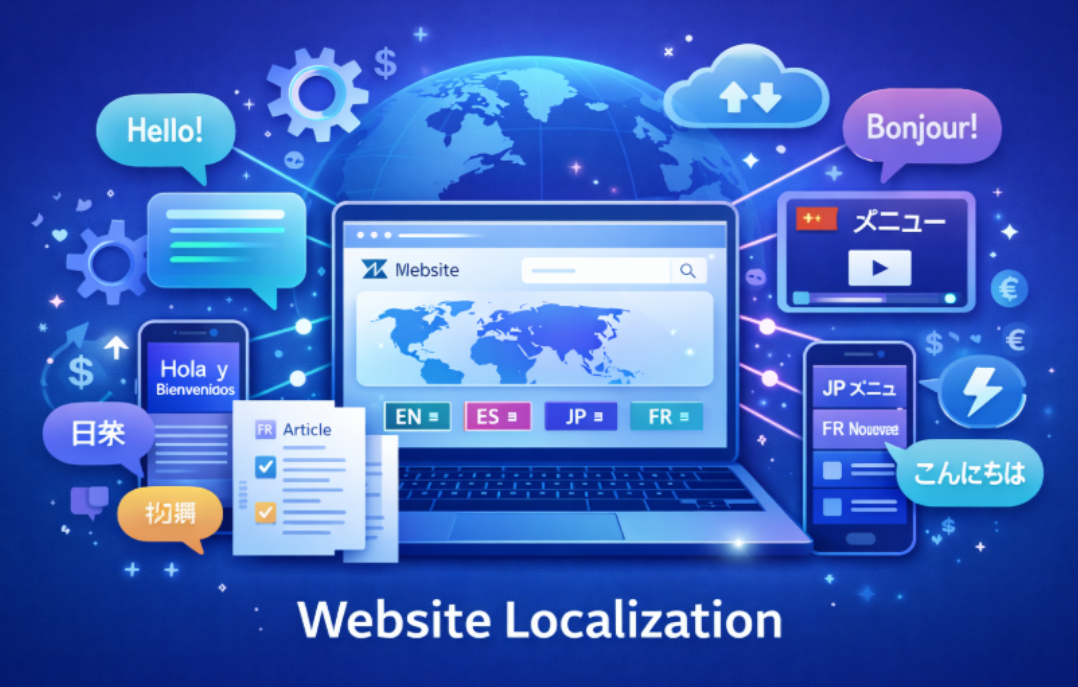
How to Localize a Website: A Comprehensive Guide

In the world of digital commerce and online engagement, localizing your website has become more than just a nice-to-have feature – it’s a necessity. Localizing your website effectively ensures that your content resonates with users in different regions and languages, helping to increase user engagement, conversion rates, and global reach. But how do you go about it? Whether you’re looking to expand into new markets or enhance the user experience for a diverse audience, this guide will walk you through the essential steps for localizing your website.

Why Website Localization Matters

Before you begin the website localization process, it’s important to grasp its significance for your business. A well-localized website builds trust and credibility with your audience. When your website is presented in the language and style of your target market, visitors are more likely to engage, stay longer, and ultimately make a purchase.

Localization is about much more than simply translating text. It’s about tailoring your website’s content, images, layout, and even functionality to align with the cultural norms, preferences, and expectations of the audience you’re targeting. This could include modifying the format of dates and currencies, choosing regionally appropriate colors, or adjusting your message to better resonate with local values. By localizing your website effectively, you can significantly enhance the user experience, reduce bounce rates, and increase conversions, as visitors will feel that your brand understands them and meets their needs.

If you’re looking to read how to localise a website effectively and capitalize on your global expansion opportunities, let’s explore the essential steps to make the process as smooth and impactful as possible.

To successfully localize your website, there are several key steps you need to follow. Let’s dive in.

1. Plan Your Localization Strategy

The first step in website localization is planning. The scope of the project will depend on your target market(s), language(s), and the resources available to you. Start by identifying the languages and regions where you want to expand. Consider using localization tools such as Crowdin to streamline the process.

Start by asking yourself a few important questions:

  • Which markets do we want to target?
  • What languages do our customers speak?
  • What content and pages need to be localized?
  • What are the legal or cultural requirements for those markets?

Once you have this plan in place, it’s time to map out which parts of your website will require translation and which will require cultural adaptation. This includes everything from text and multimedia to formatting and local regulatory requirements.

2. Content Translation and Cultural Adaptation

The most obvious aspect of website localization is translation. When translating your website, it’s essential to ensure that the tone, style, and message match the expectations of your target audience. Just translating the words won’t be enough; you’ll need to adapt your content for different cultural contexts.

Consider using a professional translation service or translation management software to ensure that your content is both accurate and culturally relevant. Translation management tools like Crowdin offer streamlined workflows to handle content translation across multiple languages efficiently.

Additionally, consider these cultural adaptations:

  • Currency and Dates: Make sure to display local currency and adapt the date format to match regional norms.
  • Images and Icons: Images that work in one culture may not resonate in another. Ensure that your images, symbols, and icons are culturally appropriate.
  • User Interface (UI): Languages vary in length, so the layout of your site may need to be adjusted. For example, some languages like German may require more space for text than others like English or French.

3. Technical Considerations for Website Localization

Website localization isn’t just about content; it’s also about how the content is presented. This includes technical aspects such as URL structure, search engine optimization (SEO), and multilingual content management.

For example, you’ll want to create subdomains or subdirectories for each language version of your site (e.g., fr.yoursite.com for French). You should also implement hreflang tags in your HTML to indicate to search engines which version of your content is meant for which language or region. This helps avoid duplicate content issues and ensures that the right users are directed to the appropriate version of your site.

Additionally, ensure that your website is compatible with local payment methods and can handle transactions in local currencies.

4. SEO for Localized Websites

When localizing your website, it’s essential to take SEO into account. SEO is key to ensuring that your localized site is discoverable by users in different regions. Just because you’ve translated your content doesn’t mean it will automatically rank well in local search engines.

Here are some SEO tips for localized websites:

  • Keyword Research: Conduct keyword research in each target language. Local users may search for different terms or phrases than those used in your original market.
  • Localized Content: Tailor your content to local preferences. This means adjusting not only your language but also the topics and themes you cover.
  • On-Page SEO: Ensure that each localized version of your website is optimized for search engines. This includes title tags, meta descriptions, and headings in the target language.

To read how to localise a website properly for SEO, be sure to follow SEO best practices for each market.

5. Testing Your Localized Website

Once you’ve translated and adapted your content, it’s time to test the localized website. Testing is crucial to ensuring that your website functions properly in all regions. You’ll want to check for:

  • Correct translations: Are the translations accurate and do they make sense in the local context?
  • Functional Links: Do all internal and external links work as expected in the localized version?
  • Page Load Speed: Does the localized website load quickly for users in different regions?
  • Mobile Optimization: Ensure that the mobile version of the site is also localized and performs well across all devices.

User testing with native speakers from your target markets is essential to catch any issues that may arise in the user experience.

6. Automating Website Localization

As your business grows and you continue to localize content for additional markets, automating the process can save you a significant amount of time and effort. Crowdin and other localization platforms offer tools that allow you to automate many aspects of website localization. These tools integrate with your existing CMS or website platform and provide a centralized location for managing translations and updates.

Automated workflows can help streamline the translation process, ensuring consistency across different languages and regions. With these tools, you can quickly update your website with new content, making it easy to keep your localized websites fresh and up-to-date.

FAQs and Final Thoughts

What is the difference between translation and localization?

  • Translation involves converting text from one language to another, while localization goes beyond translation to adapt content for a specific culture, language, or region.

How do I handle multiple languages on my website?

  • Use subdomains or subdirectories for each language (e.g., fr.yoursite.com for French or yoursit.com/fr for the French version). Implement hreflang tags to guide search engines.

Do I need to localize all of my website’s content?

  • No, prioritize the most important content for localization – such as key product pages, customer support sections, and marketing materials – before considering less critical pages.

How do I manage localized content efficiently?

  • Use translation management platforms like Crowdin, which allow for collaboration between teams, streamlined translation workflows, and automated content updates.

How much does website localization cost?

  • Costs vary based on the complexity of the project, the number of languages, and the level of adaptation required. It’s essential to budget for translation services, technical adjustments, and ongoing content management.

Final Thoughts

Website localization is a powerful tool for expanding your business globally and engaging with new audiences in their own languages. By following these steps and utilizing the right tools and strategies, you can ensure that your website resonates with users around the world and provides a seamless user experience. Remember to plan carefully, adapt your content for cultural relevance, and optimize your site for SEO to achieve success in every market.

Allianz x Spotify: This Christmas, Your Playlist Could Be Your Best Safety Feature

This Christmas, the soundtrack in your car could be shaping your driving more than you think. As millions take to the roads, Allianz is warning that fast-tempo music can subtly increase speed, stress and reaction times and is encouraging motorists to slow both the car and the beat.

To support safer journeys this year, Allianz is urging drivers to plan ahead, take their time and never drink and drive. As part of this, Allianz Ireland has partnered with Spotify on a new data-driven initiative that helps drivers manage their mindset behind the wheel, simply by adjusting the tempo of the music they listen to.

Building on this partnership, Allianz and Spotify have launched Seat Belters, an in-app experience that creates a personalised, lower-tempo playlist based on each user’s listening history. Using Spotify’s streaming intelligence, it identifies tracks in the 60–80 beat-per-minute (BPM) range to help promote a calmer mindset on the road – whether it’s the school run, inching through town for a bit of shopping, or the long drive home across the country for Christmas.

Studies show that music can have a direct influence on how we drive. Songs with a fast tempo (over 120 BPM) can subconsciously encourage drivers to speed up and change lanes much more often. In contrast, music that matches the average resting heart rate (around 60-80 BPM) is associated with calmer, more focused driving[1].

Behavioural Psychologist Dr. Becky Spelman offered insight into the science behind Seat Belters, and how the initiative can have real-world influence on driving behaviour: “As a psychologist, I’m always interested in the small, everyday inputs that shape how we feel and behave. Music is one of those influences that most of us overlook – we usually think of it as something enjoyable to have in the background, but the tempo and rhythm of what we listen to have a very real effect on the body.

“When we’re driving, these changes matter. A slight increase in heart rate or a feeling of urgency can lead to quicker reactions, more lane changes or a tendency to drive a little faster. These shifts are not usually conscious decisions; they are simply the body responding to stimulation. The research is very consistent in showing that high-tempo music makes us more reactive and more prone to quick decisions, which is not ideal when we are on the road and need calm, steady focus.”

A nationally representative survey commissioned by Allianz earlier this year found that over half of Irish adults believe music influences their driving style, with belief particularly strong among Gen Z, who are the demographic most likely to stream music while driving. Higher heart-rate variability, increased mental workload and erratic driving patterns have all been observed in response to faster music, making mindful playlist curation especially beneficial this Christmas.

Dr. Spelman explains; “This is why the Allianz Seat Belters initiative is so useful. It takes something that people already do every day – listening to music in the car – and turns it into a practical safety support. By selecting music in the range of sixty to eighty beats per minute based on your listening history, the playlist encourages the body to settle. This slower rhythm is much closer to the natural pace of a calm and regulated nervous system. When we’re in that state, our thinking becomes clearer, our decision making becomes steadier and we’re less likely to behave impulsively, making the roads a safer place for everyone this Christmas.

Allianz has also launched Dashboard Drumming, a social video activation pairing legendary drummer Stewart Copeland (The Police) with science content creator Big Manny. In a parked car, they use nothing but a dashboard and a drumbeat to demonstrate how changing tempo affects mindset, mood, and ultimately driving behaviour – making BPM instantly relatable and sharable. It’s a fun but powerful way to show how we respond to rhythm behind the wheel. Start Your Better Driving Soundtrack – to create your personalised Playlist, visit: https://www.allianz.ie/spotify or use the QR code below

Start Your Better Driving Soundtrack.

To create your personalised  Playlist, visit: https://open.spotify.com/site/allianz or use the QR code below

Hyvä vs. Luma: Which is Right for Your Magento Store

Your theme choice shapes how fast your Magento store works, how easily it grows, and how well it turns visitors into buyers. Store owners often start with Luma because it comes bundled with Magento. Many eventually look for something faster and more flexible. Hyvä has become the leading modern alternative, supported by experienced Magento frontend teams such as the Hyva theme development company that help merchants move to a stronger storefront.

Below, you will find a clear comparison to help decide which option better aligns with your growth plans.

Performance and speed

Speed sits at the heart of profitable ecommerce. Pages that load slowly create friction and lower conversion rates. Magento’s default Luma theme carries a heavy frontend stack with many scripts and dependencies. The browser loads Knockout.js, RequireJS, LESS, and many layout files. It works but slows down the storefront.

Hyvä trimmed the stack. It relies on Tailwind CSS and Alpine.js. Fewer files. Less code. Pages render faster. Stores usually score much higher in PageSpeed and show smoother navigation. Many Hyvä projects hit 90+ mobile scores on Google Lighthouse compared to under 40 for typical Luma storefronts. Merchants running paid traffic especially notice the gains because shoppers drop less often when every tap responds instantly.

Fast loading stores see more add‑to‑cart actions and better Core Web Vitals. One key metric, Largest Contentful Paint, on Hyvä often stays around 1.2–1.8 seconds, while Luma pages may reach 3.5–5 seconds or more on mobile. Better speed drives smoother navigation and stronger visibility in search. That is a solid business advantage.

Why speed differs

  • Hyvä removes more than 200 legacy JavaScript dependencies from the default frontend. “- Tailwind CSS builds only the styles actually used on the page.
  • Less processing on the client side helps mobile shoppers with weaker devices.

Even during peak traffic, stores powered by Hyvä keep a good user experience because the frontend stays light.

Design flexibility and customization

Luma allows quick launch with almost zero configuration. Visual changes are possible but require more effort. Developers work with a layered layout structure and LESS, which takes longer to style and modify. Anything beyond the basics often becomes time‑consuming.

Hyvä encourages clean UI development. Tailwind speeds up styling. Components can be reused and adapted without rewriting too much. Designers and developers both gain freedom to implement unique layouts or UX ideas.

To show the difference, here are two common scenarios

  • Start‑up stores or temporary projects often rely on Luma to save time.
  • Established brands pick Hyvä to create a custom identity and support complex product catalogs.

When you need advanced visual features or unique category navigation, Hyvä gives the creative room to build.

Development costs and licensing

Luma is free. It is included with Magento. Small stores appreciate the low entry cost. But as the store grows, development and maintenance often become more expensive because every improvement touches multiple frontend layers.

Hyvä requires a paid license. The price is about €1,000 per project. At first glance, that may feel like an additional burden. But for many businesses the math works out differently because:

  • Faster performance improves conversion and revenue.
  • Developers spend less time fixing slow scripts and styling issues.
  • Future changes require fewer resources.

Investment returns appear in both user behavior and reduced technical effort.


Scalability and long‑term benefits

A storefront needs space to grow. More categories, more content, more visitors. Luma can handle that technically but performance may degrade as the frontend becomes heavier.

Hyvä is built to scale. The architecture remains simple even when new extensions join the stack. Magento modules integrate more cleanly because the frontend layout avoids the legacy complexity.

Growing stores gain three long‑term advantages that support commercial success:

  1. Stable performance with more catalog items and traffic peaks.
  2. Easier implementation of modern UX patterns like sticky carts or advanced filters.
  3. Future‑proof technologies that developers actively enjoy working with.

When stores plan upgrades or redesigns, Hyvä keeps the process manageable.

Extension compatibility and ecosystem

Extensions power marketing, loyalty systems, payment options, and more. With Luma, nearly every vendor supports it because it has been around for years.

Hyvä’s ecosystem expands quickly. Many key modules already support Hyvä out of the box. When something does not work immediately, the Hyvä community provides tooling and fallback connections that make compatibility easier to achieve.

Merchants who rely on standard ecommerce features rarely face blockers. When switching themes or redesigning UX, experienced Magento partners help ensure compatibility and keep integrations working without downtime. Custom integrations usually move faster than expected because the markup is more predictable.

How to choose for your business

Both themes have clear strengths. The right choice depends on your current stage and goals.

Luma fits better when Hyvä fits better when
Budget is tight and the priority is a quick launch Performance directly impacts revenue and conversions
Standard look and basic functionality are acceptable Unique brand identity and custom layouts are required
MVP store or temporary project tests the audience Long‑term scaling and marketing growth are planned
Catalog is small and traffic is moderate Product range grows and UX must stay fast under load
Limited developer resources for UI work Development team wants a clean, modern frontend stack
Speed is not a top priority at early stage Mobile share is high and PageSpeed scores matter

Specialized Magento agencies support migration projects for merchants who start on Luma but later need more speed and flexibility. Their teams keep the transition smooth while preserving store functionality.

For brands running campaigns or handling thousands of SKUs, Hyvä gives a strong foundation without technical debt.

Final advice before choosing

Think not only about the launch day. A store evolves. Marketing strategies change. Buyers expect more convenience every year. The theme becomes a business decision, not only a technical one.

If your strategy includes SEO, high mobile traffic, or growth through ads, Hyvä supports that journey better. You protect your speed, lower friction during checkout, and simplify future redesigns.

Those entering ecommerce for the first time may still find Luma enough to learn the market. Later, migration stays an option when scaling becomes a priority.

Both paths work. The best one reflects where you are today and where you want the business to go next.


Top Healthcare Analytics Companies in 2025

The rapid digitalization of the healthcare sector has brought data to the forefront of clinical decision-making, operational efficiency, and patient outcomes. Healthcare providers, digital health startups, research institutions, and payers now rely heavily on intelligent data tools to extract value from vast volumes of clinical, administrative, and patient-generated information. Healthcare analytics companies are leading this transformation, offering solutions that improve care quality, reduce costs, enable interoperability, and support population health management. Below is a detailed list of the top healthcare analytics companies in 2025 that are redefining the future of data-driven healthcare.

1. Kodjin

Kodjin is an advanced, FHIR-native healthcare data analytics platform designed to help healthcare organizations unify fragmented data sources, standardize datasets, and generate actionable insights in real time. Built by Edenlab, Kodjin solves a core problem in healthcare: lack of interoperability and the difficulty of transforming raw medical data into structured, analyzable formats. 

The platform incorporates a powerful FHIR engine, ensuring compliance with global data standards while enabling seamless exchange of clinical information across systems, applications, and care environments. Kodjin empowers hospitals, payers, and digital health vendors with dashboards, predictive models, query tools, and analytics workflows that support population health analysis, operational management, clinical decision-making, and regulatory reporting. With its focus on clean data, speed, security, and scalability, Kodjin positions itself as a cornerstone solution for organizations undertaking digital transformation, building health information exchanges, or implementing modern data architectures.

2. Optum

Optum is one of the most established names in healthcare analytics, offering robust data intelligence solutions for providers, payers, and life sciences organizations. Leveraging one of the largest healthcare datasets in the world, Optum delivers insights that support predictive risk modeling, chronic disease management, and operational optimization. Its analytics tools help healthcare systems identify care gaps, improve value-based care performance, and reduce unnecessary utilization. Optum’s long-standing expertise, combined with AI-driven analytics and deep clinical datasets, makes it a trusted partner for organizations seeking to enhance care quality and efficiency.

3. SAS Institute

SAS Institute is a global leader in advanced analytics and AI-driven health intelligence. Its healthcare suite uses machine learning, statistical modeling, and data science to support clinical research, population health initiatives, and hospital management. Healthcare organizations rely on SAS for fraud detection, epidemiological modeling, outcome prediction, and quality improvement. With decades of experience in data analytics and an unmatched record in trustworthy algorithms, SAS empowers medical researchers and health systems to uncover patterns and derive insights that lead to evidence-based improvements in care.

4. Health Catalyst

Health Catalyst provides cloud-based analytics and data warehousing solutions specifically tailored to the healthcare sector. The company helps organizations aggregate, normalize, and analyze data from across clinical and administrative systems. Health Catalyst’s platform is widely recognized for driving measurable improvements in operational performance, cost reduction, and patient outcomes. Their tools support decision-making across quality metrics, financial operations, and patient experience. By focusing on outcome-driven analytics and real-world implementation, Health Catalyst stands out as a leading partner for hospitals aiming to accelerate digital transformation and enhance clinical efficiency.

5. IQVIA

IQVIA is a powerhouse in healthcare analytics, blending real-world data, artificial intelligence, and life sciences expertise. Known for its extensive datasets and advanced data modeling, IQVIA supports pharmaceutical companies, researchers, and health providers with tools for real-world evidence analysis, clinical trial optimization, and patient journey insights. Their platform enables organizations to analyze treatment effectiveness, improve drug development processes, and strengthen population health strategies. IQVIA’s unique ability to integrate clinical, genomic, and behavioral data makes it a foundational analytics partner for organizations focused on precision medicine and innovation.

6. Truven Health Analytics (IBM Watson Health)

Truven Health Analytics delivers evidence-based insights powered by AI and natural language processing through IBM Watson Health technologies. The company provides analytics solutions for population health management, clinical benchmarking, and operational efficiency. Truven’s tools allow hospitals to evaluate performance, improve patient safety, and align care delivery with national quality standards. Government agencies and employers also rely on Truven for policy evaluation and cost analysis. With strong analytical capabilities and a focus on actionable intelligence, Truven helps healthcare systems make informed decisions that improve outcomes and reduce costs.

7. MedeAnalytics

MedeAnalytics provides enterprise analytics solutions designed to help healthcare organizations strengthen both financial and clinical operations. Its platform offers real-time dashboards, revenue cycle analytics, and population health tools that enable healthcare leaders to uncover inefficiencies and identify improvement opportunities. MedeAnalytics focuses on intuitive data visualization, giving stakeholders at all levels—from executives to clinical managers—the ability to interpret data quickly and effectively. Their predictive analytics solutions also support resource planning, patient engagement, and quality improvement initiatives. By turning complex data into clear, actionable insights, MedeAnalytics enables organizations to achieve measurable performance enhancements.

Conclusion

The healthcare analytics landscape is becoming increasingly vital as organizations navigate growing data requirements, regulatory pressures, and the shift toward value-based care. Each company on this list plays a crucial role in advancing data-driven healthcare—whether through enhanced interoperability, predictive modeling, research analytics, or operational intelligence. Kodjin, with its FHIR-native architecture and focus on real-time data standardization, stands out as a leader for modern healthcare ecosystems seeking scalable and future-proof analytics solutions. Together, these top healthcare analytics companies empower the industry to improve patient outcomes, increase efficiency, reduce costs, and accelerate innovation. In a world shaped by digital health, analytics is not just a tool — it is the foundation of smarter, safer, and more efficient care delivery.


3 Ridiculously Fast WordPress Hosts That Leave Competitors in the Dust

WordPress site speed determines success or failure. When pages take too long to load, visitors leave and search engines penalize rankings. After analyzing performance data from independent testing authorities throughout 2024 and 2025, GreenGeeks emerges as the fastest WordPress host at its price point. The company achieves 395ms average time-to-first-byte speeds while charging only $2.95 monthly for entry-level plans.

Most hosting companies promise fast speeds. Few deliver consistent performance under real-world conditions. Independent testing from Hostingstep, Pingdom, and other monitoring services reveals which hosts actually perform when traffic spikes hit and databases strain under load.

GreenGeeks Takes First Place With LiteSpeed Power

GreenGeeks runs every WordPress site on LiteSpeed Web Server technology. This server software processes requests up to 50 times faster than Apache servers that most budget hosts use. The LiteSpeed architecture supports HTTP/3 and QUIC protocols, reducing the time browsers wait for initial server responses.

Independent benchmark tests show GreenGeeks achieves 158ms average time-to-first-byte in optimal conditions. Global load times stay under 1.2 seconds even when tested from 40 international locations. The company maintains this performance through data centers in Chicago, Montreal, Amsterdam, and Singapore. Each facility uses SSD storage exclusively, eliminating the mechanical delays that traditional hard drives create.

Premium plan customers see even better results. Sites hosted on GreenGeeks Premium plans load up to 200% faster than traditional shared hosting setups. This speed boost comes from combining LiteSpeed servers with Redis caching technology. The system automatically installs the LiteSpeed Cache plugin when you set up WordPress, requiring no manual configuration to activate these performance gains.


Load Handling That Matches Premium Hosts

Traffic spikes destroy most budget hosting services. Servers slow to a crawl when multiple visitors arrive simultaneously. GreenGeeks handles sudden traffic differently. Stress tests sending 50 concurrent users to test sites show GreenGeeks maintains 26ms response times under maximum load. This performance matches results from WP Engine and Kinsta, companies charging five to ten times more for managed WordPress hosting.

The remarkable aspect of GreenGeeks’ load handling appears when you examine the testing conditions. While other top performers relied on content delivery networks during stress tests, GreenGeeks achieved elite response times using only its core server infrastructure. Pages loaded quickly during traffic spikes thanks to the combination of SSD storage, LiteSpeed cache, and free Cloudflare CDN integration that comes standard with every plan.

Real users confirm these laboratory results. Customer testimonials describe sites remaining fast even when running heavy backend builders and processing complex WordPress operations. One user reported their site loads in under one second according to Pingdom tests, faster than 94% of all tested websites on the internet.


Rocket.net Delivers Managed WordPress Excellence

Rocket.net specializes exclusively in managed WordPress hosting. The company maintains the fastest time-to-first-byte performance among all tested hosts, averaging 335ms in independent benchmarks. This speed comes from their custom-built infrastructure designed specifically for WordPress requirements.

Every Rocket.net account includes automatic updates, daily backups, and proactive security monitoring. The platform handles all server maintenance and optimization tasks, letting site owners focus on content creation rather than technical management. Their support team consists entirely of WordPress experts who understand plugin conflicts, theme optimization, and database tuning.

Rocket.net pricing starts higher than shared hosting options. Plans begin at $30 monthly for a single site. The investment pays off through reduced maintenance time and consistent performance. Sites hosted on Rocket.net rarely experience slowdowns or crashes, even during viral traffic events. The platform automatically scales resources when visitor numbers increase, preventing the performance degradation that affects fixed-resource hosting plans.

WPX Hosting Combines Speed With Simplicity

WPX Hosting achieves 365ms average time-to-first-byte speeds while maintaining one of the industry’s simplest user interfaces. The company built its control panel specifically for WordPress users who want powerful features without technical complexity.

Every WPX account includes unlimited site migrations performed by their technical team within 24 hours. The service handles domain transfers, email account setups, and SSL certificate installations at no extra charge. This comprehensive migration support eliminates the technical barriers that prevent many users from switching hosts.

WPX includes their custom-built CDN with all plans. Unlike generic content delivery networks, WPX CDN optimizes specifically for WordPress assets. The system caches theme files, plugin resources, and media uploads across global edge servers. This specialized approach reduces load times for international visitors while decreasing bandwidth usage on origin servers.

Performance Testing Reveals True Winners

Independent testing organizations provide the only reliable performance data for hosting comparisons. Marketing claims mean nothing without third-party validation. Recent tests from Hostingstep show GreenGeeks achieving 418ms time-to-first-byte among shared hosting providers, the fastest result in that category. When tested against all hosting types, including premium managed WordPress services, GreenGeeks maintains competitive speeds at a fraction of the cost.

Uptime statistics tell another important story. GreenGeeks maintained 99.98% uptime between 2024 and 2025, with no more than four minutes of total downtime per month. Current 2025 monitoring shows 99.96% uptime as of February 28. These figures match or exceed uptime guarantees from hosts charging premium prices.

Direct comparisons highlight the value proposition. WP Engine test sites load in 582ms on average, while GreenGeeks sites average 697ms. The 115ms difference becomes negligible when you consider GreenGeeks costs $2.95 monthly versus WP Engine’s $20 minimum. For most WordPress sites, saving over $200 annually makes the tiny speed difference acceptable.

Infrastructure Specifications Matter

Server hardware and network architecture determine hosting performance more than marketing promises. GreenGeeks deploys enterprise-grade equipment across all service tiers. Entry-level shared hosting customers use the same SSD storage arrays and LiteSpeed servers as premium account holders. The primary difference between plans involves resource allocation rather than infrastructure quality.

Geographic distribution improves global performance. GreenGeeks operates data centers across four continents, letting customers choose server locations near their primary audience. Sites targeting European visitors host in Amsterdam, while Asian-focused projects deploy to Singapore facilities. This geographic flexibility reduces latency for international traffic without requiring separate CDN services.

Database optimization makes WordPress run faster regardless of hosting specifications. GreenGeeks configures MySQL servers specifically for WordPress query patterns. The optimization reduces database response times and prevents the slow queries that bog down many WordPress installations. Combined with built-in object caching, these database improvements accelerate dynamic content generation throughout WordPress sites.

Pricing Structures and Value Analysis

GreenGeeks starts at $2.95 monthly for single-site hosting with unlimited bandwidth and storage. The Pro Plan at $5.95 monthly allows unlimited WordPress installations on one account. Premium plans at $11.95 monthly double the performance of Pro plans through dedicated resources and priority processing.

Comparing these prices to performance metrics reveals exceptional value. GreenGeeks delivers 395ms average response times at $2.95 monthly. Premium hosts charging $30 to $100 monthly achieve similar speeds, making GreenGeeks the logical choice for budget-conscious site owners who refuse to compromise on performance.

All GreenGeeks plans include features that competitors charge extra for. Free CDN integration, SSL certificates, domain registration, and automatic backups come standard. The company also provides free site migration services, eliminating the technical hurdles and potential downtime associated with switching hosts. These included features add hundreds of dollars in annual value beyond the base hosting costs.

Real-World Performance Under Pressure

Laboratory benchmarks provide useful comparisons, but real-world performance determines actual user satisfaction. GreenGeeks powers over 600,000 websites globally as of 2025. These sites range from personal blogs to business websites processing thousands of daily transactions.

Customer reviews consistently praise GreenGeeks for maintaining speed during traffic surges. Users report stable performance even when running resource-intensive plugins like page builders and membership systems. The combination of LiteSpeed servers, SSD storage, and intelligent caching prevents the slowdowns that plague lesser hosting services.

The company’s growth trajectory confirms customer satisfaction. GreenGeeks has expanded from a startup to hosting over half a million sites while maintaining top performance rankings for five consecutive years. This sustained growth occurs in a competitive market where dissatisfied customers switch providers easily.

Making the Right Hosting Decision

Speed testing data, uptime monitoring, and customer feedback all point to the same conclusion. GreenGeeks provides the fastest WordPress hosting at budget prices, while Rocket.net and WPX offer excellent alternatives for users needing managed services or specialized features.

GreenGeeks suits WordPress users who want premium performance without premium prices. The combination of LiteSpeed servers, SSD storage, and intelligent caching delivers speeds that match or exceed hosts charging significantly more. For $2.95 monthly, site owners get enterprise-level infrastructure and performance that seemed impossible at this price point even two years ago.

Rocket.net and WPX serve different needs. These hosts excel for businesses requiring white-glove service and guaranteed performance regardless of cost. Their managed services eliminate all technical responsibilities, making them ideal for agencies and enterprises that value convenience over savings. Both deliver exceptional speeds and reliability that justify

their higher prices for appropriate use cases.


What Is a Block RFQ Tool?

Executing large trades in the crypto market isn’t as simple as clicking “buy” or “sell.” When the size of an order is big enough to shift prices on a public order book, institutional traders need more sophisticated tools to avoid slippage, delays, and unwanted attention.

That’s where block Request for Quote (RFQ) tools come in. Designed to help source liquidity and lock in competitive pricing, these tools are used to execute large trades more efficiently, often outside of the standard exchange interface. They allow traders to request quotes from multiple counterparties before committing to a deal, reducing price impact and improving execution quality.

They’re commonly found on institutional trading platforms and used alongside a crypto exchange, especially when placing large trades that require discretion and control.

What Does RFQ Mean?

RFQ stands for “Request for Quote.” In traditional finance, it’s a method where a buyer asks multiple sellers to quote a price for a specific trade. The buyer then reviews the offers and selects the most favorable one. It’s commonly used in bond markets, commodities, and over-the-counter (OTC) deals.

In the context of crypto, an RFQ works the same way. A trader (usually institutional or high-volume) requests a price to buy or sell a specific quantity of a cryptocurrency. That request is sent to a group of liquidity providers who respond with their best offers. The trader can then choose the quote that best meets their needs.

When paired with large trade sizes, this process becomes a “block RFQ”, a system designed specifically for executing high-volume transactions with minimal market disruption.

How Does a Block RFQ Tool Work?

Using a block RFQ tool typically involves four key steps. First, the trader enters the desired trade details, which include asset, amount, and direction (buy or sell). That request is then distributed to a list of pre-approved liquidity providers. Each provider evaluates the request and submits a price quote in return.

The trader reviews the quotes and chooses the most competitive offer. Once accepted, the trade is executed directly between the two parties, often off the public order book. This helps maintain privacy and avoid sudden price swings that could occur if the same trade were placed openly.

These tools are especially useful for institutions that want to maintain control over large trades while gaining visibility into pricing across multiple sources.

Why Do Block RFQ Tools Matter?

Large trades can create major problems on public order books. If a single order consumes too much liquidity, it can move the market price unfavorably before the order is even filled. This is known as slippage, and it can be costly, especially when dealing with high-volume transactions.

Block RFQ tools help avoid that by allowing trades to be executed off-book. Instead of broadcasting intentions to the entire market, traders use a private request process to source quotes. This preserves order confidentiality and prevents frontrunning or sudden price shifts.

For institutions, that level of control means better pricing, cleaner execution, and more predictable outcomes.

Who Uses Block RFQ Tools (and When)?

Block RFQ tools are typically used by institutional traders, including crypto hedge funds, OTC desks, asset managers, and liquidity providers. These users often need to move large positions without disrupting the market or revealing their strategies.

Use cases vary from rebalancing portfolios to hedging to shifting assets between wallets or platforms. Some traders also use RFQs when onboarding or exiting clients with significant capital, where transparency and price efficiency are both priorities.

While they’re not usually ideal for time-sensitive trades, block RFQ tools are favored when size and price control matter more than speed.

Block RFQ vs. Other Trading Methods

Compared to public order books, block RFQ tools offer more privacy and better control over execution. Instead of hoping for favorable market conditions, traders get multiple firm quotes in a controlled environment, reducing the need to split large trades across platforms or time.

Unlike OTC trades, which often involve one-on-one negotiation, RFQs allow for competitive pricing from multiple providers at once. They also differ from dark pools, which hide order details but don’t guarantee pre-trade pricing transparency.

The biggest advantage is knowing the price in advance and executing at that rate. This is something standard order books can’t always guarantee for large orders.

A Tool for Smarter Large-Scale Trading

Block RFQ tools help solve a major challenge in crypto trading: moving large volumes efficiently, securely, and discreetly. For institutional users, they offer price visibility, lower slippage, and access to deep liquidity, making them an essential option when size matters more than speed.

Unlike standard market orders, which can be unpredictable and impact prices, RFQ tools let traders control the terms of the trade before committing. The process allows for clearer comparisons across multiple liquidity providers, creating a more transparent and competitive environment.