JOURNEY – ARIA 3-in-1 Wireless Charging Station Review

The ARIA 3-in-1 Wireless Charging Station is the latest Qi2-certified charger from Australian consumer electronics brand JOURNEY. No stranger to 3-in-1 wireless chargers which we hace covered countless models of this is the latest one to hit the market and we have been testing it out.

ARIA, a follow-on from SWIV, GLYDE, and other portable JOURNEY chargers, features a distinctive hinged build that endows it to freely pivot between flatlay and phone stand mode.

In flatlay mode – within which ARIA folds into a fraction of its fullest size – the Apple-certified charger simultaneously fast charges a phone and AirPods together.

In phone stand mode, it flips out to vertical architecture, standing a phone, and delivering fast wireless charging to three devices – phone, earbuds, and an Apple Watch.

The flagship fast charger includes faster charging speeds (up to 15W for Qi2-certified iPhones and other phones), precise magnetic alignment for more efficient energy transfer, more user-friendly manual charging experiences, and enhanced safety.

Check out our hands on review down below for more.

Features

  • 3-in-1 fast wireless charging for iPhone, Apple Watch, and AirPods
  • 15W Qi2-certified charging for iPhone and other Qi2-enabled devices
  • Fast Apple Watch charging for quick power-ups on the go
  • Qi2-certified and Made for Apple for optimised charging performance
  • Foldable, travel-ready design for easy portability
  • Touch-control ambient light adds a soft glow when needed

Other 3-in-1 charger reviews

BUY

Video Review

Edifier Debuts Cross-Scenario Audio Solutions for Modern Home Entertainment at CES 2026

Edifier, a global leader in premium audio solutions, is proud to unveil a comprehensive lineup of products designed to transcend traditional boundaries. Showcasing distinct form factors and advanced features, this new collection delivers a premium, cross-scenarioaudio experience—elevating soundscapes at home, during high-performance gaming, and for on-the-go listening. 

Introducing the M90: Audio Beyond the Desktop 

Building on the success of the M60, Edifier’s new M90 active speaker extends premiumdesktop sound into full home-entertainment setups, bridging the gap between desktop audio, TVs, streaming platforms, and gaming consoles. Its adaptable design suits a wide range of environments—from compact desks to living rooms—while intuitive controls and an omni-directional remote make it effortless to switch between devices and sources. 

The M90 features a two-way design with a 4-inch long-throw mid-low driver and 1-inch silk-dome tweeter, delivering 100W RMS power and up to 100dB SPL. Bi-amped 24-bit/96kHz DSP provides pristine audio. Its extensive connectivity—including Line-in, Optical, USB-C, HDMI eARC, and Bluetooth 6.0 with LDAC—ensures the M90 delivers a truly flexible, all-in-one audio experience for work, play, and everything in between. 

Near-Field Monitor Series: Optimized for Modern Production 

Designed for today’s home studios and mobile workflows, Edifier’s MR Series near-field monitors deliver studio accuracy in compact spaces. The MR3 offers a space-saving design for desktop setups, while the three-way MR5 features a built-in woofer and side-mounted acoustic lens for powerful bass in a small enclosure. 

All MR Series models feature end-to-end DSP, bi-amp or tri-amp amplification, tonal tuning, androom/placement compensation, along with wide off-axis response for accurate monitoring beyondthe sweet spot. Both the MR3 and MR5 have earned prestigious Japan’s VGP 2025 Design Award. 

Advancing Monitoring: Near-Middle Field Series 

Edifier expands its monitor lineup with the Near-Middle Field Series, led by the XR6. This three-way active monitor includes in-box auto-calibration software that analyzes roomacoustics and automatically optimizes setup, ensuring accurate performance in any workspace. 

Showcasing the QR Series: Understated Aesthetics with Hi-Fi Pedigree With RGB lighting now a standard feature of modern gaming setups—and those setups increasingly serving as hubs for video broadcasting, live streaming, and remote work—Edifier’s

QR65 and QR30 adopt a refined approach to RGB, enhancing ambiance without visual distraction. 

The QR Series uses an Infinity Mirror design to create subtle, immersive ambient lighting that adds depth without distracting from a clean, minimalist desk setup, while its Hi-Fi-grade acoustic design matches the demands of modern high-resolution content. The QR65 features a two-way design with a long-throw mid-low driver and silk-dome tweeter, 70W RMS output with bi-ampedDSP, a precision maze-type bass-reflex port for deep, controlled bass, and a built-in GaNfast charger for efficient power delivery and clean cable management. 

HDMI Integration: Elevating Audio Connectivity 

While HDMI has long been standard for AV receivers and soundbars, standalone active speakers have rarely offered it. With high-resolution and immersive content becoming the norm, Edifier’s latest lineup integrates HDMI eARC, bringing seamless, high-bandwidth audio to desktop and home setups. Premium models like the M90, R2750MKII, and S355DB now deliver future-ready, cinema-quality performance with next-generation displays and media players. 

Visit Edifier at CES 2026 

Date: January 6–9, 2026 

Location: Las Vegas Convention Center 

Booths: Central Hall, Booth #19040 

See our Edifier Reviews

HP OfficeJetPro 9135e Printer review

The HP OfficeJet Pro 9135e is positioned as the flagship of HP’s latest OfficeJet lineup, designed specifically for heavy-duty home offices and small businesses. It replaces the popular 9025e, bringing subtle but meaningful refinements in speed, security, and paper handling.

If you are looking for a “laser alternative” that can handle high-volume document workflows without the bulk of a toner-based machine, this is one of the strongest contenders on the market and comes with a very nice external touchscreen display and also you can print direct from your mobile phone or laptop via the HP Print app which works really well.


Key Specifications

Feature Performance
Print Speed Up to 25 ppm (Black) / 20 ppm (Color)
Paper Capacity 500 sheets (Dual 250-sheet trays)
Scanner Single-pass, 2-sided (duplex) ADF (35 sheets)
Monthly Volume Recommended up to 2,000 pages
Connectivity Dual-band self-healing Wi-Fi, Ethernet, USB, Bluetooth

This is a Productivity Workhorse, The standout feature is the dual 250-sheet paper trays. This allows you to keep a full ream of paper loaded at all times, or use one tray for standard A4/Letter and the other for specialized media like envelopes or letterheads.

With Efficient Scanning the single-pass duplex ADF is a lifesaver for office environments. It scans both sides of a page simultaneously, which is significantly faster and more reliable than “reversing” ADFs that physically flip the paper.

Modern Interface & Security, The 4.3-inch color touchscreen is responsive and intuitive. It also features HP Wolf Pro Security, which provides hardware-level protection against cyber threats—a rare but welcome addition for home office hardware. You can see more in the video review below.

The printer can be noisey like others when printing a large run of sheets again you can get a sample in the video below but in fairness most printers suffer this.

The HP OfficeJet Pro 9135e is a refined, reliable evolution of the 9000 series. It is best suited for users who value paper capacity and scanning speed above all else. This is Ideal for poeple that  frequently scan double-sided documents and need to print 500+ pages a month without constantly refilling the paper tray.

Key Features

Duplex printing

Allows you to print on both sides of the page, cutting your paper use by up to 50%.

Scan size ADF (maximum)

Allows multiple pages to be copied or scanned at one time

Borderless

Borderless photos are printed right to the edge of the paper. You get beautiful photo prints with no trimming!

Digital sending standard features

Save time by sending scanned documents or photos directly from your printer to email recipients.

Wireless capability

HP wireless direct is a new feature that allows your Wi-Fi capable devices (for example: smart phones, tablets, or computers) to make a wireless network connection directly to your printer without using a wireless router or access point.

Connectivity standard

Add this device to your office Ethernet network to share with your workgroup.

Twelve South Curve Mini Review

Universally compatible with iPad, tablets and e-readers, the Twelve South Curve Mini raises devices up to 6 inches for optimal viewing comfort and usability, whether streaming a show at home, working in a cafe, or having a second screen at hnad at your desk, conference calling or sketching, the precision hinges ensure a smooth transition to any desired angle. The hinges are strong and will not move to where you set them at.

Easily adjustable in both portrait and landscape modes, the stable slip-resistant base and silicone padding ensure sturdiness and prevent scratches.

The Curve Mini is made of anodised aluminium weighs just 0.24kg and folds completely flat so it can slip into the included travel sleeve for easy portability which can be tough to remove at first but will loosen up over time. It’s the perfect travel companion for creatives, remote workers or those who use their tablet for gaming and entertainment. Also this can hold laptops which I actually tested it with or you could use a foldable phone too and will have no issues with either.

In addition to its functionality, it also makes a stylish accessory. Available in three different matte colours: dune, slate and coastal blue to complement Twelve South’s Curve Nano Qi2-compatible smartphone stand.

Available now for £49.99 from Twelve South UK.

See our Twelve South Reviews

Video Review

Residential Proxy Authentication Methods

Residential proxies continue to grow in popularity among businesses, researchers, and developers who want to conceal their geographic locations, harvest geographical content digitally, and collect data from websites without detection. However, using a residential proxy involves more than simply utilizing an IP address that conceals your true IP address.

Most importantly, authentication ensures that only authorized users have access to proxy networks. Misconfigured authentication may result in exposure of login credentials, blocked IP addresses, or use of your proxy by unauthorized parties. In this article, we discuss several major methods of authenticating residential proxies, compare the various approaches, and provide guidance on best practices for implementing them.

Why Authentication Matters

Many times, shared or rented infrastructure underpins residential proxies. Without stringent authentication systems:


Unapproved users may access the proxy pool, which might result in abuse or exploitation, including spam, scraping, and suspect traffic.


Credentials might expose your proxy identity to other people, thereby risking blocks or banishment.


Overuse or abuse of intellectual properties can harm their reputation and lower the success rates for all consumers.


Appropriate authentication guarantees only authorized clients’ access, thereby preserving IP integrity and steady, dependable performance for genuine users.

The Main Methods at a Glance

Most modern residential proxy providers support two primary authentication methods:


Username/Password Authentication

IP Allowlisting (also called IP Whitelisting or IP Authorization)


These methods differ in flexibility, security, and suitability depending on your working environment.

Username/Password Authentication

Basically, what this means is that you have to enter your credentials every time you connect using the proxy. When connecting to an HTTP(S) Proxy, HTTP Basic Authentication is typically sent over the HTTP headers every time you connect to the proxy. Authentication for SOCKS5 proxy occurs as part of the initial connection setup, known as the handshake.


A common format looks like:

http://username:password@proxy.host:port

Pros And Cons

Pros:

Works from any network or dynamic IP.

Easy to integrate into scripts, applications, and browsers.

Cons:

Credentials must be stored securely.

Logs, URLs, or debugging tools can expose usernames or passwords if not handled properly.

IP Allowlisting

IP allowlisting allows your authentication through verification of the public IP address that was created when you set up your proxy. As long as all requests are coming from an Approved IP address, authentication occurs automatically without the need for a username/password.

To create this approval, simply log into your proxy provider and add your home/office/server’s IP address. Once this is completed, any request from the Approved IP will be recognized by the provider as legitimate.

Pros And Cons

Pros:

No credentials to control or leak

Requests are cleaner because no authentication headers are required.

Ideal for static IP settings that are stable.

Cons:

Not ideal for mobile, hotel, or dynamic IPs.

Any modification to your IP requires you to refresh the allowlist so as to connect.

Choosing the Right Method

Your work processes and the network environment in which you work will dictate the most effective authentication method. If you work in a location that does not change (a home server, an office network, or hosting in a data center) and use static IP addresses, then IP allowlisting is a very simple and secure way to authenticate users.

However, if you are constantly on different networks or are traveling or using a dynamic IP address, then using a combination of username/password is a much more flexible way to authenticate users. How you will determine which one of these methods is best for your system will depend on:


Your network’s reliability

How you use your system

How much risk are you willing to take on


In addition to that, some providers allow you to switch between auth types as your project grows. To decide which authentication method suits your setup best, it’s ideal to contact a reliable and trusted service provider. If you are not familiar with a service provider, you can start by visiting here.

Implementation Snippets

Here are a few simple examples illustrating how both authentication methods work in practice.

Username/Password (HTTP Proxy via cURL):

curl -x http://username:password@proxy.host:port https://api.ipify.org

IP Allowlisted Proxy (No Credentials Needed):

curl -x http://proxy.host:port https://api.ipify.org

SOCKS5 With Username/Password:

curl –socks5 username:password@proxy.host:port https://api.ipify.org

SOCKS5 With IP Allowlisting:

curl –socks5 proxy.host: port https://api.ipify.org

 Always verify your configuration by querying an IP-check service. If the response matches the proxy’s IP, your authentication is properly configured and working.

Conclusion

To maintain both security and reliability, residential proxies must support authentication. Depending on the configuration of your network, your decision on which type of authentication to use (username/password or IP allowlisting) will depend solely on your specifications. Once configured correctly, residential proxies will operate securely and with maximum efficiency.


ESET celebrates Black Friday with up to 50% off

ESET, a global leader in cybersecurity solutions, is offering savvy shoppers up to 50% off ESET HOME Security to celebrate Black Friday 2025. Deals are available from now until Tuesday 2nd December, giving consumers the opportunity to save on ESET’s latest all-in-one solution.

Protecting more than 100 million homes around the world, ESET’s cutting-edge security products are based on more than 30 years of research and are continually updated to address real-time threats. ESET HOME Security is a streamlined offering for consumers with three subscription tiers that provide users with broad and reliable digital life protection.

ESET is offering up to 50% off all three subscription tiers from now until 2nd December 2025:

UK Deals*:

ESET HOME Security Essential – 30% off 3 devices/1 year – was £44.99, now £31.49

ESET HOME Security Premium – 40% off 3 devices/1 year – was £74.99, now £44.99

ESET HOME Security Ultimate – 50% off 5 devices/1 year – was £114.98, now £57.49

US Deals*:

ESET HOME Security Essential – 50% off 1 devices/1 year – was $49.99, now $24.99

ESET HOME Security Premium – 50% off 1 devices/1 year – was $79.99, now $39.99

ESET HOME Security Ultimate – 50% off 5 devices/1 year – was $179.99, now £89.99

*Discount varies depending on the number of devices and length of subscription.

Despite ESET HOME Security already having a long list of features including Antivirus & Antispyware, Firewall, Ransomware Shield, Anti-Phishing, Safe Banking, Safe Browsing, Dark Web Monitoring, VPN, Folder Guard and Gamer Mode to name a few. ESET has recently introduced new upgrades to the software that include:

  • Ransomware Remediation – seamlessly creates encrypted backups so users can detect, block, and recover from ransomware with minimal disruption.
  • Enhanced scam protection – now covers SMS, email, phone calls, URLs, QR codes, and malicious files.
  • New tools: Microphone Monitor and Website Security Inspector to improve phishing detection.
  • ESET VPN – now available to Premium users (previously Ultimate only).
  • ESET HOME platform – updated for easier family protection and better overall user experience.
  • ESET Link Checker – a free online tool that scans any URL for phishing, scams, and malware.

These updates are designed to address the evolving threat landscape with special attention to prevention, ensuring a best-in-class user experience.

For more information on ESET’s Black Friday discounts and award-winning internet security for Windows, macOS and Android, visit www.eset.com.

ARSMEL VisaGo – World’s Smallest 100W Travel Adapter & Voltage Indicator Review

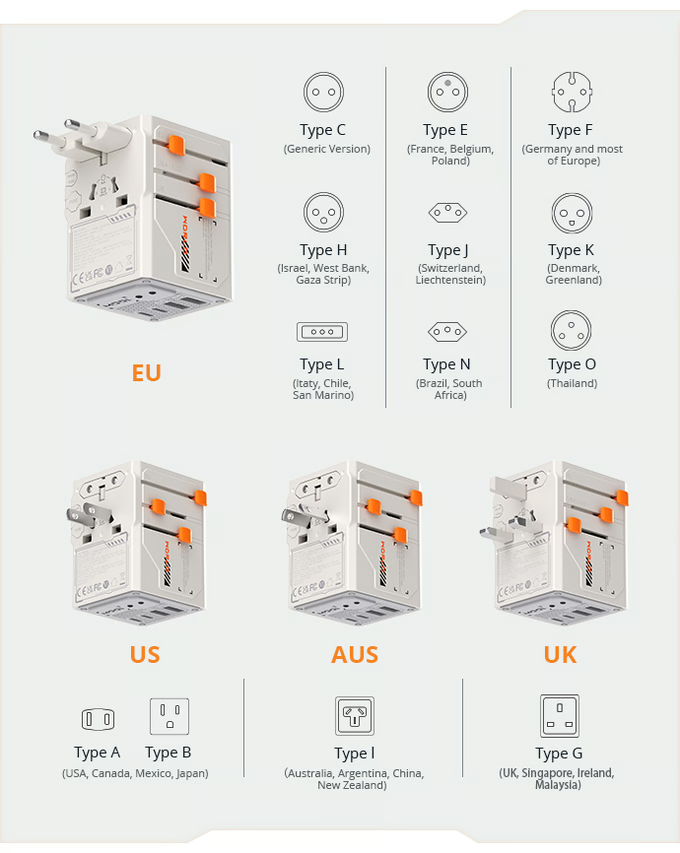
In a world of travel adapters there is no shortage at all as to what you can buy today and we have testes countless offerings over the years and they are getting better all the time, there is however a new one on the market right mow in Kickstarter claiming to be the Smallest 100W travel adaper and also has a voltage indicator built in.

VisaGo features two 10A fusesone for normal operation, and one as a backupEasily replaceable manually, these fuses automatically cut power if the load exceeds capacity, keeping you and your devices safe.

With advanced GaN technologyVisaGo All-in-One travel adapter delivers up to 100W of efficient power in an ultra-compact form. Designed for today’s on-the-go, it features 2 AC outlets, 3 USB-C ports, and 2 USB-A ports—so you can fast-charge everything from your phone and tablet to your laptop and camera, all at once again for a person that carrys alot of tech and has at home this is ideal to charge multiple devices at once and save time fussing around.

This time around they have added 2 standard voltage indicators at the bottom of VisaGo. It features two universal indicators: 110V± and 220V±. Once plugged into the local outlet, the corresponding light will turn on, instantly showing you the voltage standard.

VisaGo is built for global travelers with a wide voltage range of 100–250V. From bustling cities to remote hideaways, it adapts seamlessly to local power standards and works in over 200 regions and countries and for someon who travels alot like many others this could be the ideal kit for you to have at your disposal.

Long-lasting design

The VisaGo 100W Travel Adapter is engineered with a special PC (polycarbonate) + glass fiber composite, enhanced with long-lasting internal lubrication to ensure exceptional durability and safety. This advanced material combination provides high strength, superior flame resistance, and excellent impact protection, while the built-in lubricant significantly reduces wear on moving parts such as the foldable plug mechanism during long-term use.

In rigorous mechanical endurance testing, the plug structure maintained tight integrity and smooth operation after over 20,000 cycles of continuous folding and insertion—effectively preventing the contact issues commonly caused by metal fatigue or plastic wear in conventional designs, ensuring a remarkably long lifespan.

To withstand extreme global climates, VisaGo has undergone comprehensive environmental reliability testing. It has successfully completed over 1,000 hours of aging tests under conditions ranging from +40°C high heat to -25°C freezing cold, with no deformation, cracking, or performance degradation observed. These results demonstrate VisaGo’s exceptional environmental adaptability and long-term reliability, making it your truly dependable power companion for journeys around the world.

Check out the video below for more and a hands on and check the link out for some of their other cool products

BUY

Other travel adapter reviews

VideoReview

ESET Updates Its Home Security Portfolio for Advanced Ransomware and Scams

ESET, a global leader in cybersecurity solutions, today announces its upgraded consumer offering, ESET HOME Security and its Small Office/Home Office (SOHO) offering, ESET Small Business Security. Launched earlier in 2025 for businesses and enterprises, today’s release makes ESET’s award-winning Ransomware Remediation feature available to consumers and SOHOs. ESET Ransomware Remediation seamlessly creates encrypted backups – enabling users to detect, block, and recover from ransomware attacks with minimal disruption.

Recognizing scams as a global threat that can harm virtually anyone, anywhere, at any time, ESET now delivers enhanced scam protection, addressing attacks vectoring from all types of sources, including SMS, email, phone calls, URLs, QR codes, malicious files, and more. ESET also launched advanced functionalities within existing features, including Microphone Monitor and Website Security Inspector.

“As a progressive digital life protection vendor, ESET carefully monitors the current threat landscape and develops its protection solutions accordingly,” said Viktória Ivanová, Vice President of Consumer and IoT Segment at ESET. “Heightened scam protection, added Ransomware Remediation, and multiple privacy protection improvements make both ESET consumer and SOHO offerings robust, all-in-one solutions for households and Small Office/Home Offices seeking reliable security that has low impact on performance and is easy to use.”

This launch expands the availability of ESET VPN to ESET HOME Security Premium users. The updated ESET HOME security management platform simplifies security management, making it easier for home admins to protect their families, and SOHO owners to observe exactly who and what are protected, and to distribute security apps with a consistent, simplified experience.

Key ESET HOME Security/ ESET Small Business Security (for Windows) improvements include:

Ransomware Remediation — Originally developed for large businesses, Ransomware Remediation minimizes the impact of ransomware attacks. Once a potential ransomware threat is identified by ESET Ransomware Shield, ESET Ransomware Remediation immediately creates backups of affected files, and after the threat is mitigated, it restores the files, effectively reverting the system to its previous state.

 Enhanced privacy protection — New Microphone Monitor detects and alerts users to any unauthorized attempts to access the microphone hardware on Windows devices.

 Enhanced browser security  New Website Security Inspector adds an extra layer of protection against phishing, scams, and malicious websites. This feature scans the rendered HTML in the browser to detect malicious content that can’t be detected on the network level and by URLs blacklist.

New ESET Cyber Security/ ESET Small Business Security (for macOS) features and updates:

macOS 26 Tahoe support — User can enjoy ESET Cyber Security on the latest version of macOS.

HTTPS & HTTP/3 support — Improves overall end-user protection when online.

Device Control — This feature monitors and manages external devices connected to the Mac. It helps protect against malware and unauthorized transfers of data by restricting access to specific device types or even individual devices.

ESET HOME Security and ESET Small Business Security are available across all major operating systems—Windows, macOS, Android, and iOS—and cover all typical smart home devices. On top of that, ESET Small Business Security also protects Windows servers. The updated offerings are designed to address the evolving threat landscape with special attention to prevention – ensuring a best-in-class user experience because truly effective cybersecurity should be easy to set up and administer.

More information about ESET’s consumer offering and subscription tiers can be found here. A detailed description of the SOHO offering is available here.

Twelve South PowerCord Review

The Twelve South PowerCord combines a 30W wall adapter and USB-C cable into a single, streamlined compact design which means a simple solution to your charging needs, For example i have countless plugs and cables hwoever these are all two part accessories while this is one plug and one cable all in one, thumbs up for that.

The plug itself is also small the cable is flat and braided and is robust and comes in tow lengths which is 1.2 or 3 meters it also has 30W PD 3.o charging which means fast charging all round and compatible with USB-C devices.

Overall this is an ideal solution for those who have USB-C devices which is now the norm for at home the office or when travelling and it is about time it is a solid built product which will last and certainly going into my travel bag or for use around the home and office here.

Features

  • No need to match cables to adapters.
  • Fast, 30W PD 3.0 charges all your USB-C devices.
  • Compatible with USB-C phones and devices.
  • Flat, durable cable stays tangle-free.
  • Low-profile plug fits easily in tight spaces.
  • Available in 1.2 m or 3 m


Bringing style and substance to everyday charging, the Twelve South PowerCord is available now in either Slate or Dune, from £39 from Twelve South UK and Amazon UK

See our Twelve South Reviews 

Video Review