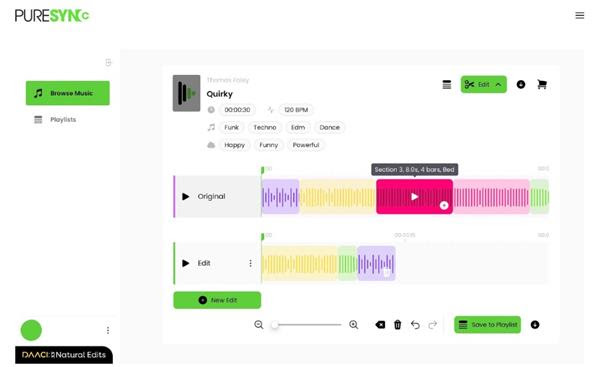
DAACI launches ‘Natural Series’, a comprehensive product portfolio, that will see the release of plugins, music tools and editing technology released over the next year, kicking off with ‘Natural Edits’, a powerful music editing tool for the global sync market to make any track instantly adaptive.
The Natural Series has evolved from DAACI’s development of patented AI and musician-led core technologies. Each element will satisfy the needs of different audiences and use cases, from creators who want to enhance their process, to Music Rights Holders looking for solutions that satisfy the rapidly growing demand for creating personalised music experiences.
The first element in the Natural Series is Natural Edits, now available to Rights Holders within the global sync market. Future elements of the series will include Natural Sync which will enable any type of user, with any ability to create new track edits against films, to supercharge the creative process. DAACI is also beta testing their first plugin for producers and composers.
DAACI’s CEO Rachel Lyske comments: “From the beginning of our journey, we have been on a mission, working on our core technology, the brain of DAACI, to build a solid, ambitious ecosystem. Our ethical, artist-led approach has been welcomed by our partners and the music industry and we’ve been eagerly asked when there will be products to test, ‘buttons to press’. Now we have them. The time is right to put these tools into the hands of users and introduce people to ‘the DAACI way’, and we can’t wait to hear what people will create with them.”
About Natural Edits
Natural Edits brings powerful, patented music editing technology to Rights Holders and their Licensees within the global sync market. By embedding Natural Edits into their entire catalogues within their existing web-based platforms, Rights Holders can enable internal and external users to engage with a track at a level of detail and control as never before. Natural Edits can also be added to web-based platforms incrementally with functionality initially added to a small number of test tracks, then smoothly scaled up. To support this, DAACI will provide a fast, simple API that Music Rights Holders’ web-based platforms can use to dynamically query which tracks are supported and place an ‘Edit’ button on them.
From the moment they begin considering a track, users will be exposed to the track’s latent potential to fit countless contexts from looping beds for background music, to topped-and-tailed snippets for adverts, extended pieces for arbitrary length videos, and precise edits matching specific narratives and music briefs.
Natural Edits enables any user of any skill level to create and deliver a personalised edit of any track in a few simple clicks, driving discoverability and, just as importantly, licence potential of a track.
Natural Edits has already been adopted by music platforms including Pure Sync. Julian Goodkind, CEO of Pure Sync says: “Pure Sync are delighted to be incorporating Natural Edits. We see this as a pivotal moment in our adoption and utilisation of Ethical AI tools. This elevates and amplifies our creative capabilities as Music Supervisors within the Sync world, to deliver more creatively, efficiently and cost effectively.”
DAACI invites Music Rights Holders to enquire about Natural Edits integration at hello@daaci.com.
To find out more, or to sign up for future beta testing visit: daaci.com
We’re going discuss the top 7 no-watermark video editors for PC in 2023. We’re going to mention their distinctive features and the pros of using each one. After reading this article, you should easily be able to choose the one that fits your needs.
1. Movavi Video Editor
This no-watermark video editor stands out with its user-friendly interface and intuitive controls, making it a popular choice for beginners seeking a hassle-free video editing experience. Here are the pros of using it in comparison to other tools:
Built-in media content: It includes a library of royalty-free music tracks and sample videos to enhance and complement your projects.
Fast rendering and exporting: The software offers efficient rendering and exporting options, enabling users to save time during the final production process.
Audio editing and enhancement features: Alongside video editing, it allows users to edit and enhance audio tracks to achieve optimal audio quality. We don’t want sloppy audio in our videos.
Screen recording: It enables users to capture and record their screen activity, which is ideal for creating tutorials, demonstrations, or gameplay videos.
Automatic video creation: There’s a feature called The Montage Wizard which provides a quick and automated way to create professional-looking videos by guiding users through the editing process.
2. Clideo
Thisedgy video-making tool features cloud-based functionality, allowing users to edit videos online without the need for software downloads or installations, making it accessible and convenient for users across various devices and systems. Other pros:
Online accessibility: It allows users to edit videos online from anywhere with an internet connection, eliminating the need for specific hardware or software installations. It’s an awesome feature.
Privacy and security: The developers value your privacy and ensure that your uploaded videos are not shared with any third parties, providing a secure environment for your editing projects.
Quick processing: The powerful cloud infrastructure enables fast processing times, allowing you to edit and save your videos efficiently. However, it depends on the length and complexity of the videos.
3. Kapwing
Another program that has a unique feature of collaborative video editing where it allows multiple users to work together on a video project simultaneously, making it ideal for teamwork and cooperative content creation. Other pros include:
Creative templates: The software features a library of pre-designed templates for quick and easy video creation. Something suitable for both professionals and beginners trying to make great videos.
Subtitle generation: It allows users to automatically generate subtitles for their videos or manually add and customize them. The possibility to customize subtitles is more than welcome in many cases.
Cloud storage: Similar to the previous one, it offers secure cloud storage for edited videos so you can easily access and share them.
Social media optimization: This video editor provides features that are tailored for social media platforms, including resizing, aspect ratio adjustments, and meme creation.
4.OpenShot video editor
This universal video editor is great because it’s available across all platforms, including Windows, Mac, and Linux. It allows users to enjoy its features and capabilities regardless of the preferred platform. These are the pros of using it:
Keyframe animation: This feature empowers users to have precise control over animated elements, allowing them to create dynamic and customized visual effects.
Multi-track editing and timeline: It enables users to work with multiple audio and video tracks simultaneously, providing greater flexibility and control over the editing process.
Real-time preview: The software allows users to preview their edits in real-time, providing instant feedback on how changes impact the final result, enhancing the editing workflow and efficiency.
5. Animoto
As another video editor without watermark branding, it has intelligent video creation technology that automatically generates professional-quality videos by analyzing the content you choose, making it effortless to create polished videos with minimal effort or expertise. Other pros are:
Analytics and insights: It allows you to gain valuable insights into the performance of your videos with built-in analytics, helping you understand audience engagement. You can optimize your videos according to that.
Branding and customization: The software lets the users customize videos with their brands, logos, watermarks, colors, and fonts to maintain their brand consistency.
Drag and drop: The intuitive drag-and-drop interface allows us to easily arrange and edit our media files. It requires no technical expertise. It’s great for beginners.
Text and caption options: We can add text overlays, captions, and subtitles to our videos to convey messages, enhance storytelling, or provide context. This can be great for tutorials.
6. CyberLink PowerDirector
There’s one feature that sets this Windows PC video editor, its AI-powered style effects which utilize artificial intelligence algorithms to transform videos into stylized visual effects, giving them a distinct and artistic look not easily replicated by other editors:
360-degree video editing: The editor allows us to edit and enhance immersive 360-degree videos with dedicated tools for trimming, adding effects, and creating dynamic perspectives.
Professional-grade color correction: It lets us utilize powerful color grading tools, including LUTs(Look-Up Tables), color wheels, and advanced adjustment controls for precise color manipulation.
Customizable design tools: The software allows the user to create custom titles, menus, and graphics with its built-in design tools and templates for a polished and professional look.
Dynamic video effects: There’s a possibility to access a wide range of visual effects, transitions, titles, and animated overlays to add flair and creativity to your videos. Most video editors have effects, but this one has great effects.
7. Shotcut
The final cross-platform video app on this list has a powerful and customizable filter system, which allows users to apply a wide variety of visual and audio effects to their videos, giving them extensive creative control over their projects. Here are the other pros of using it:
Native timeline editing with multitrack functionality: It enables users to create intricate and layered video compositions by stacking and arranging multiple video and audio elements, resulting in visually dynamic and immersive storytelling.
Hardware encoding and decoding for improved performance: The software leverages hardware encoding and decoding capabilities, utilizing the power of the user’s hardware to enhance performance and ensure smooth editing and playback of videos.
Wide selection of video and audio filters and effects: It provides a broad range of video and audio filters and effects, including color grading tools, transitions, visual effects, and audio effects, providing users with extensive creative options.
Customizable interface and keyboard shortcuts: The software allows users to customize the interface layout and create personalized keyboard shortcuts, optimizing the editing workflow based on individual preferences.
Conclusion
These 7 pieces of software are the top no-watermark video editors for PC available. They all have their distinctive unique features based on which you can choose your preferred one. Hopefully, we made your decision much easier for you.