DesignCap – A Digital Graphic Design Tool. #GraphicDesign #DesignCap #Tech

DesginCap is an online digital graphic design tool that allows us to make many graphic creations easily. The emergence of its version 2.0 brought a website with tools that allowed us to share designs very easily to social networks, websites or blogs with a URL. In this digital world, there are more and more tools allow us to create very simple visual material of good quality have emerged. 


Among these tools, DesignCap offers us a very practical way to make a appealing graphic design, with its very clear interface and the range of options for editing graphic design. Everyone can control it even though you are not a graphic designer.


Simple interface, increased productivity

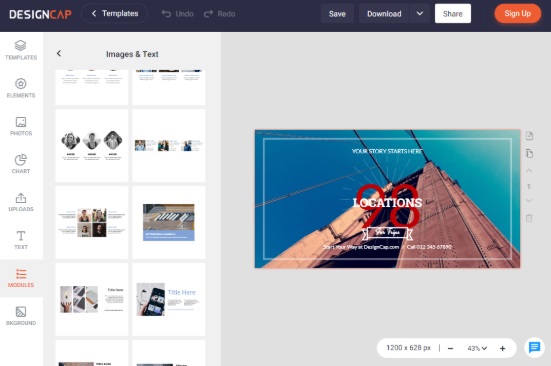
As you can see the interface is very simple. You can create a custom size design and use the all the options in DesignCap to shape your design.

The objects can be selected from the left side and edited in the main canvas. You can also see that you are able to share the work from using Share button, either to social networks or just share on any website with a URL.


Templates for designs 

To create a design like a pro in quick time, you can choose one of the templates in DesginCap. It offers us a large number of templates which it divides into two categories:

Marketing & Event

Infographic

Poster

Flyer

Invitation

Card

Business Card

Brochure

Facebook Ad

Menu

Logo

Social Media Graphic


YouTube Channel Art

YouTube Thumbnail

Facebook Cover

Twitter Header

Tumblr Banner

Email Header

Facebook Post

Instagram Post

Pinterest Graphic

You can find a specific template by searching a keyword in the search box of the full range of templates offered by DesignCap.

What can we do with DesginCap?

DesginCap has created a space where shares design tips, ideas for seasonal designs, among many other tips: https://www.designcap.com/learn/

Here you can know what we can do with DesignCap tool and how to make it with this tool. For example, you can find:

How to create a perfect poster

Ultimate Guide to Infographic Design

Color Psychology Marketing

15 Customizable Halloween Party Invitation Templates

There are many other tips here to help you fully control DesignCap tool.

There is no doubt DesignCap is a highly recommended web application for all professionals as well as the amateurs who want to create graphic designs like a pro.  

DesignCap, An Alternative to Canva to Create Posters/Flyers Blog headers and more. #Web #Bloggers

If you are looking for a professional website that will help you create posters and flyers in a completely free way, you will realize that the web is full graphics programs easy to use even by beginners. So you have to select the best ones that can offer you reliable service and give you a wide choice of different models and available resources. The leading software of this category is definitely Canva. But today, we have tested DesignCap for you. I have used canva multiple times to create headers for posts on my own site and other things. 


Why you should give DesignCap a try?

– Registration is free.

– No download is required.
– Many professional templates.
– Full poster and flyer customization.

– Posters and flyers to meet every need.
– Choose elements and retouch the way you want.
– Unlimited possibilities. Just unleash your creativity on DesignCap.com.

Many people prefer to try their hand in the realization of graphic design projects, and that is why they are always looking for the simple, intuitive and fast services. DesignCap is suitable for those unfamiliar with the professional graphics programs but wants to create something beautiful and professional.


As you can see from the image above, the DesignCap interface is straightforward and intuitive; through the left section you can choose between:

Template – where different templates are divided into categories;
Photo – where you can upload a photo taken from your computer or Facebook album;
Text – to add texts to your own works;
Clipart – to add icons and similar elements;
BKGround – to choose the background of your creations.

Each design can be downloaded to your Windows or Mac computer, but it is also possible to save the project and edit it later, so you must register with the service to keep your projects in memory.

DesignCap is a totally free service and to use it you only need to go to the official website https://www.designcap.com and eventually register.

You can get inspiration by looking at hundreds of professional templates for various occasions and events offered on the website. DesignCap offers users a wide range of editing tools that help to customize posters and flyers with just a few clicks of the mouse, ensuring satisfactory and professional results.


To make your design even more unique, you can search for the right image among those available on the site, or upload the most beautiful and original photo suits. On Designcap.com you can also find an extensive library full of fonts, clip-art images, shapes and touches of various kinds.


If you want to embark on a journey in poster and flyer designs, DesignCap is the ideal site available. You can create graphics projects to meet various needs and cover different themes such as sales, advertising, sports, marriage, holidays and much more.

Overall, you can customize the posters and flyers as you like in DesignCap. Just take a try and have fun making fantastic posters and flyers to amaze your audience.