Today, Google made a series of announcements marking the next chapter of our Gemini era — with new names, new products and new ways to experience their most capable AI.
Gemini is evolving to be more than just AI models. It supports an entire ecosystem — from the products that billions of people use every day, to the APIs and platforms helping developers and businesses innovate.
The news below.
A new name for Bard
Our mission with Bard has always been to give users direct access to our AI models, and Gemini represents our most capable family of models. To reflect this, Bard will now simply be known as Gemini.
Gemini — Advanced
You can already chat with Gemini with our Pro 1.0 model in over 40 languages and more than 230 countries and territories. And now, we’re launching Gemini Advanced to help people easily collaborate with the best of Google AI.
Gemini Advanced will give users in more than 150 countries and territories access to Ultra 1.0, our largest and most capable state-of-the-art AI model, better at highly complex tasks like coding, logical reasoning, following nuanced instructions and collaborating on creative projects. It’s currently available in English, and we’ll expand to more languages over time.
Introducing a new subscription for the Gemini era
Gemini Advanced is available as part of our brand new Google One AI Premium Plan for $19.99/month, starting with a two-month trial at no cost. This plan gives the best of Google AI and our latest advancements, along with all the benefits of the existing Google One Premium plan, such as 2TB of storage. In addition, AI Premium subscribers will soon be able to use Gemini in Gmail, Docs, Slides, Sheets and more.
Building next-gen AI boldly and responsibly
We continue to take a bold and responsible approach to bringing this technology to the world. And, to mitigate issues like unsafe content or bias, we’ve built safety into our products in accordance with our AI Principles. Before launching Gemini Advanced, we conducted extensive trust and safety checks. You can find more detail in our updated Gemini Technical Report.
One of the biggest benefits of Bard, an experiment to collaborate with generative AI, is that it can tailor its responses to exactly what you need. For instance, you could ask Bard to start a trip planning Doc for you and your friends, draft up your online marketplace listing, or help explain a science topic to your kids. And now, Bard is getting even better at customizing its responses so you can easily bring your ideas to life. Check out what is on offer now below.
Today we’re rolling out Bard’s most capable model yet. Bard now integrates with Google apps and services for more helpful responses. We’ve also improved the “Google it” feature to double-check Bard’s answers and expanded features to more places.
Connect to Google apps and services
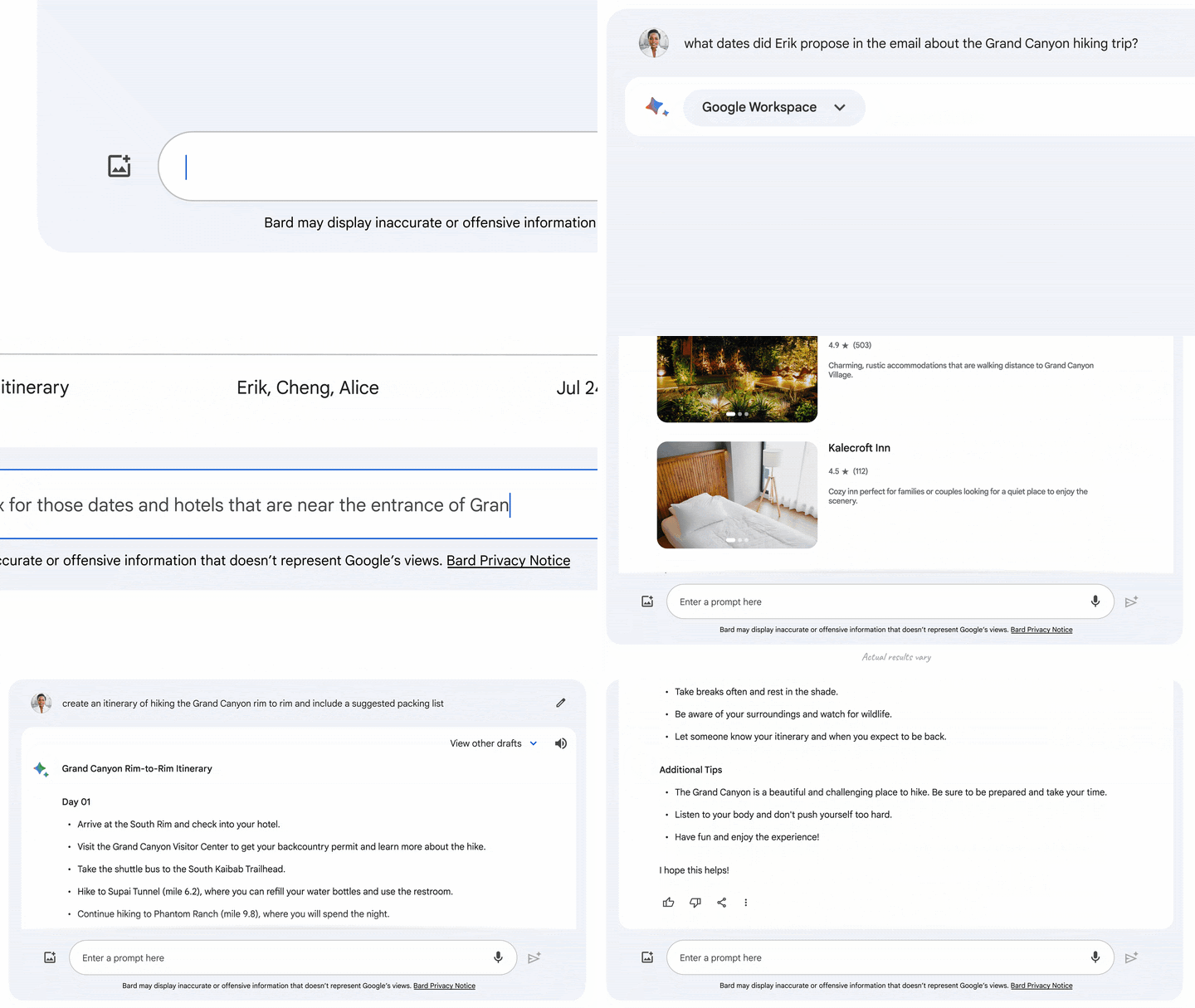
Today we’re launching Bard Extensions in English, a completely new way to interact and collaborate with Bard. With Extensions, Bard can find and show you relevant information from the Google tools you use every day — like Gmail, Docs, Drive, Google Maps, YouTube, and Google Flights and hotels — even when the information you need is across multiple apps and services.
For example, if you’re planning a trip to the Grand Canyon (a project that takes up many tabs), you can now ask Bard to grab the dates that work for everyone from Gmail, look up real-time flight and hotel information, see Google Maps directions to the airport, and even watch YouTube videos of things to do there — all within one conversation.
Or, imagine you’re applying for a new job and using Bard to help with the process. You could ask Bard to “find my resume titled June 2023 from my Drive and summarize it to a short paragraph personal statement,” and continue collaborating on your new cover letter.
We’re committed to protecting your personal information. If you choose to use the Workspace extensions, your content from Gmail, Docs and Drive is not seen by human reviewers, used by Bard to show you ads or used to train the Bard model. And of course, you’re always in control of your privacy settings when deciding how you want to use these extensions, and you can turn them off at any time.
Easily double-check responses and build on shared conversations
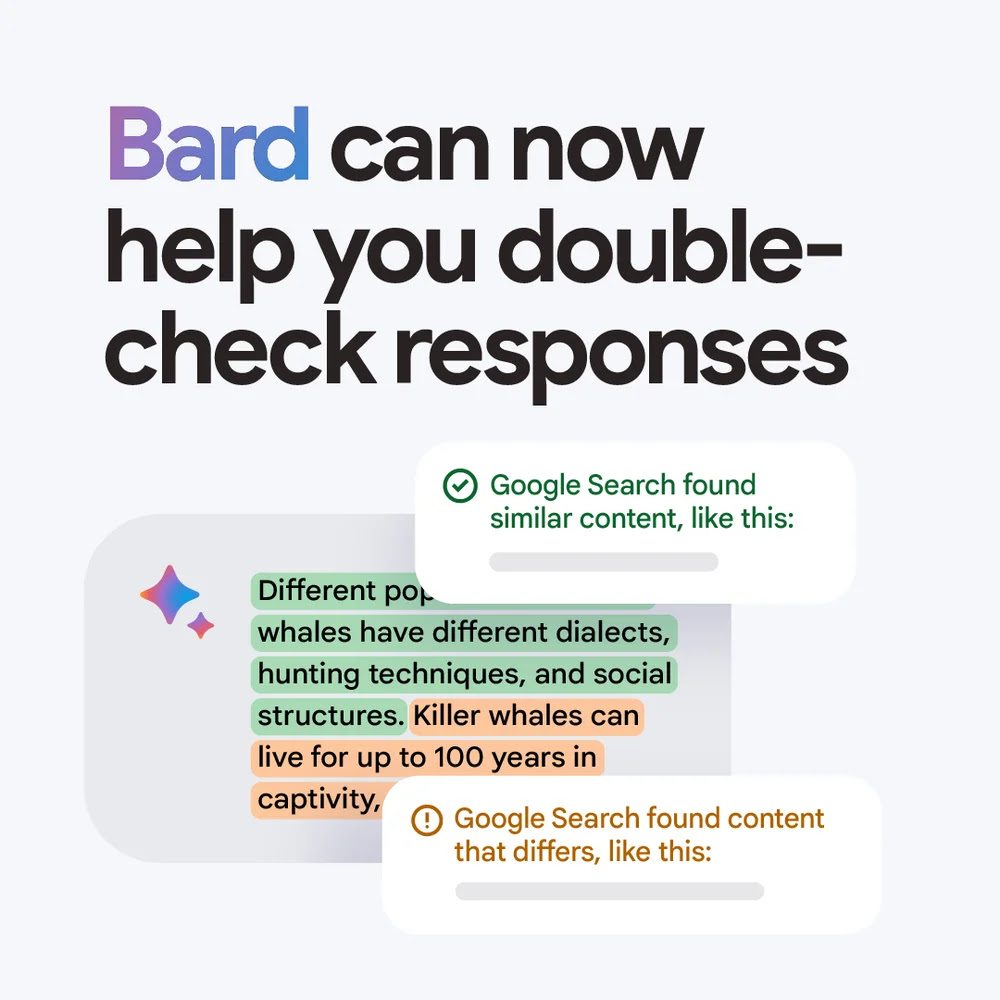
Starting today with responses in English, you can use Bard’s “Google it” button to more easily double-check its answers. When you click on the “G” icon, Bard will read the response and evaluate whether there is content across the web to substantiate it. When a statement can be evaluated, you can click the highlighted phrases and learn more about supporting or contradicting information found by Search.
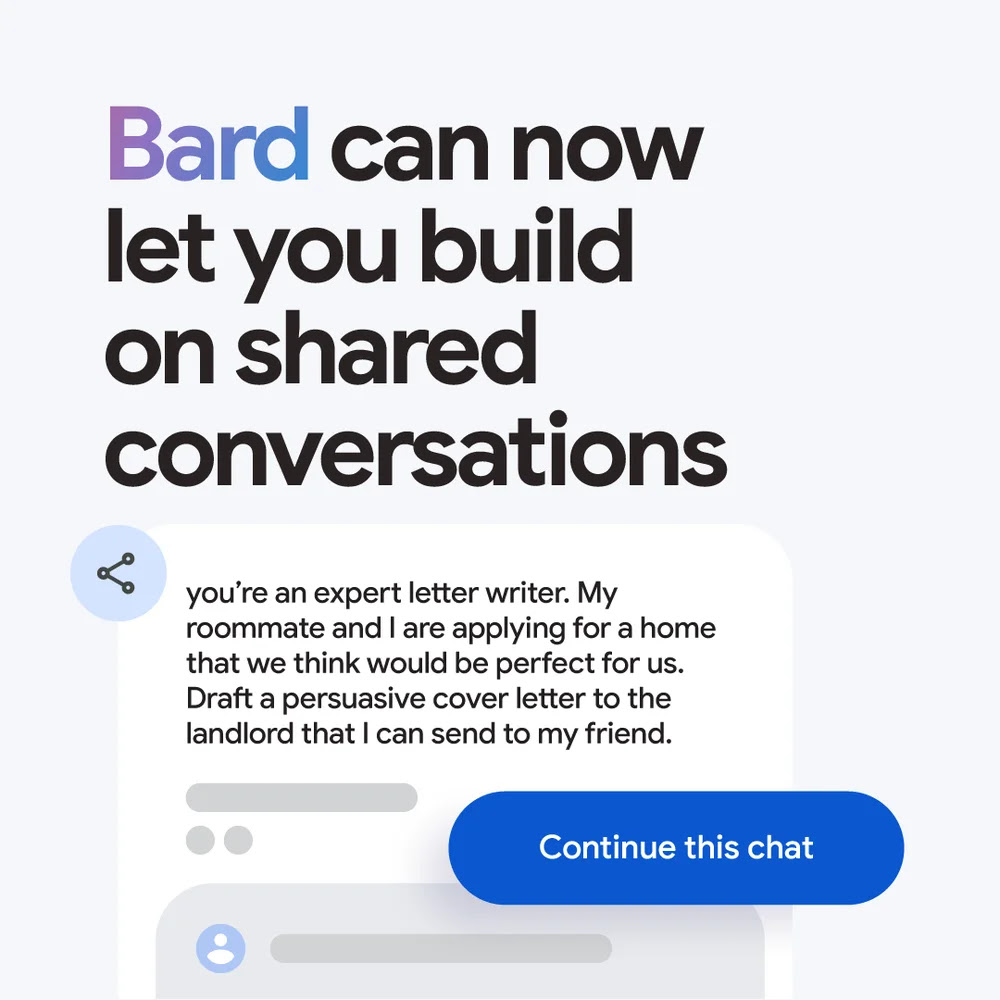
We’re also making it easier to build on others’ conversations with Bard. Starting today, when someone shares a Bard chat with you through a public link, you can continue the conversation and ask Bard additional questions about that topic, or use it as a starting point for your own ideas.
Access features in more places
As we continue to build Bard responsibly, we’re now expanding access to existing English language features — such as the ability to upload images with Lens, get Search images in responses, and modify Bard’s responses — to more than 40 languages.
Curiosity and imagination are the driving forces behind human creativity. Whether it’s a child inventing a game, friends dreaming up their next adventure, or an entrepreneur coming up with a new business idea, the ability to imagine new possibilities is one of the most innate human qualities. Bard today has launched in Europe with new features and more, check out the press release below..
That’s why we created Bard: to help you explore that curiosity, augment your imagination and ultimately get your ideas off the ground — not just by answering your questions, but by helping you build on them.
Today we’re announcing Bard’s biggest expansion to date. It’s now available in most of the world, and in the most widely spoken languages. And we’re launching new features to help you better customize your experience, boost your creativity and get more done.
Interact with Bard in new places and languages
Starting today, you can collaborate with Bard in over 40 languages, including Arabic, Chinese, German, Hindi and Spanish. You can also now access Bard in more places, including Brazil and across Europe. As part of our bold and responsible approach to AI, we’ve proactively engaged with experts, policymakers and privacy regulators on this expansion. And as we bring Bard to more regions and languages over time, we’ll continue to use our AI Principles as a guide, incorporate user feedback, and take steps to protect people’s privacy and data.
GIF shows the text “Bard can collaborate with you in over 40 languages, including…” followed by names of different languages.
Get more customized responses
We’re launching new updates so Bard’s responses better suit your needs:
Listen to responses: Sometimes hearing something out loud can help you approach your idea in a different way. That’s why, starting today, you can listen to Bard’s responses. This is especially helpful if you want to hear the correct pronunciation of a word or listen to a poem or script. Simply enter a prompt and select the sound icon to hear Bard’s answers. This feature is now live in over 40 languages.
Easily adjust Bard’s responses: You can now change the tone and style of Bard’s responses to five different options: simple, long, short, professional or casual. For example, you can ask Bard to help you write a marketplace listing for a vintage armchair, and then shorten the response using the drop-down. This feature is live in English and will expand to new languages soon.
Boost your productivity
Four new Bard features are also launching today to help you get more done:
Pin and rename conversations: We’ve heard you want to be able to revisit prompts, so we’re adding new ways to pin and rename your conversations with Bard. Now when you start a conversation, you’ll see options to pin, rename and pick up recent conversations in the sidebar. For example, if you ask Bard to help you compare outdoor sports for the summer, you can revisit the tips later. This feature is now live in over 40 languages.
GIF shows a conversation with Bard. The cursor selects the option to pin the chat in the sidebar and renames it.
Export code to more places: We’re continuing to see interest in using Bard for coding tasks. So today we’re adding a new feature that allows you to export Python code to Replit, in addition to Google Colab. This feature is now live in over 40 languages.
Share responses with friends: We’ve also made it easier to share part or all of your Bard chat with your network. With shareable links, you can share your ideas and creations with others. This feature is live in over 40 languages.
Use images in your prompts: Images are a big part of how we put our imaginations to work. At I/O we announced we’re bringing the capabilities of Google Lens into Bard. Whether you want more information about an image or just need help coming up with a caption, you can now upload images with prompts and Bard will analyze the photo to help. This feature is now live in English, and we’ll expand to new languages soon.
GIF shows the text “Bard can now collaborate using Google Lens” and a picture of a bike.
So the next time you have an inkling of an idea, a full-fledged concept or just need to brainstorm, give Bard a try. You’ll not only find the tools to bring that idea to life, you may also uncover an entirely new one.